1. NETSetup Specification
Parent Entry Document: NETSetup.adoc
1.1. CLI Command Specification
Direct GitHub downloads require sign-in with access to private osisa/NETSetup
repository. Anonymous requests can return HTTP 404 even when asset exists.
SHA-256 Hash of NETSetup.exe:
D1B899C2517BDF5D96716783CF9BFE89662A11763B4F0AF1A5E22B371C516530
NETSetup.exe install and configure aspects of a given machine. During regular NETSetup installation it need not be downloaded separately. Executable provided here for advanced users.
Use NETSetup.exe [command] --help to get help for a specific command.
1.1.1. How to call a command
One binary, one verb per call, no sub-verbs:
NETSetup.exe <command> [--option <value>] [--flag]NETSetup.exe --help list every command; NETSetup.exe <command> --help list that command’s options. --version print build version. Every run print NETSetup banner + version line first, so log always say which build produced it.
Where binary sit, depending how machine got it:
| Situation | Path |
|---|---|
Installed via Chocolatey (Windows) |
on |
Booted from a NETSetup ISO / USB stick (WinPE) |
|
Proxmox / Linux host |
|
Dev box, from source |
|
Rules that hold for every command:
-
Elevation. Anything that write to machine (
install,update,create-iso,install-drivers,backup,restore, disk + edition + domain commands) callExitIfNotElevatedand abort withNEEDS TO BE RUN PRIVILEGED (AS ADMINISTRATOR)when not elevated. Read-only commands (get-,check-,list-*,info) run unelevated. -
Exit codes.
0success,1failure - nothing else. Scripts can branch on that alone. On failure message also land in timestamped<yyyy-MM-ddTHH-mm-ss>.errfile next to logs. -
Logs. Under
LoggingOptions.LogsPathOverridefromappsettings.json, else/NETSetup/Logs. -
Config lookup is automatic. Commands that need customer config (
install,update) resolve it by machine’s own serial number: serial → matchingConfig/<serial>#<ticket>.mapMapFile →#<ticket>.json. Nothing to pass by hand.installaccept--ticket/--hostnameto override that detection;updatetake no config argument at all. -
Remote source. Commands that fetch files (
ensure-file,ensure-folder,create-iso, image/driver steps) read from configured remote source (DropboxNETSetup/BOOT/…). Paths passed toensure-*are relative to that boot directory, not to local disk.
1.1.2. Command Index
All 60 commands, grouped as registered in src/NETSetup/CLI/NETSetup.cs:
| Group | Commands |
|---|---|
Core lifecycle (6) |
|
Build (3) |
|
Info / diagnostics (8) |
|
Hash (13) |
|
Network (12) |
|
Disk (5) |
|
Windows (8) |
|
Files (4) |
|
Dev (1) |
1.1.3. Core Lifecycle Commands
Source domain: src/NETSetup/CLI/Commands/Core/
1.1.3.1. install
NETSetup.exe install [--ticket <ticket>] [--hostname <hostname>]-
Privilege: Elevated required.
-
Options:
-
--ticket <ticket>(optional): Override automatic serial-to-ticket lookup. -
--hostname <hostname>(optional): Override target machine block inside customer config.
-
-
Behavior: Install and configure machine according to its NETSetup configuration. Look up config by machine’s serial number (
Config/<serial>#<ticket>.map→#<ticket>.json). On WinPE / LinuxPE it run full OS installation pipeline (auto-backup if existing Windows found, disk wipe/partition, image apply, driver injection, boot config). On installed OS it configure software, domain join, capabilities, backup restore, and triggerupdate.
# Auto-detect ticket and hostname by hardware serial number
.\NETSetup.exe install

# Explicit override for ticket and machine hostname
.\NETSetup.exe install --ticket 9154 --hostname devBuilder05
1.1.3.2. update
NETSetup.exe update [--skip-os-updates] [--skip-choco-packages]-
Privilege: Elevated required.
-
Options:
-
--skip-os-updates(optional): Skip HP / Windows / kernel OS-update steps. -
--skip-choco-packages(optional): Skip Chocolatey package upgrade/install while keeping choco itself plus NETSetup self-update. Both flags exist for CI and test runs where OS-update leg is slow and irrelevant.
-
-
Behavior: Update installed machine software. Run self-update check (
EnsureLatestBinaryOrReexecon Proxmox), Chocolatey upgrade-all, ensure all config-specified packages with exact versions are installed, and refresh Group Policy if domain-joined. On Proxmox host this verb also runEnsureProxmoxPostInstall,EnsureCustomerVms, andEnsureCustomerLxcsto provision and converge the customer VM/LXC stack (see How it works).
# Full production update (or Proxmox host VM/LXC convergence)
.\NETSetup.exe update

# Fast CI/test update skipping slow OS and package upgrade legs
.\NETSetup.exe update --skip-os-updates --skip-choco-packages
1.1.3.3. ensure-update-proxmox
NETSetup.exe ensure-update-proxmox [--host <ip-or-hostname>] [--user <user>] [--password <password>] [--port <port>] [--jump-host <ip>] [--target-major <version>] [--minor-only] [--reboot]-
Privilege: Root on target Proxmox VE host (local or remote SSH).
-
Options:
-
--host <ip-or-hostname>(optional): Remote Proxmox VE host IP or hostname. When omitted, updates the local Proxmox host directly. -
--user <user>(optional): SSH/API username for remote connection (default:root). -
--password <password>(optional): Password for remote connection (or jump host when--jump-hostis set). Falls back toProxmoxOptions.Passwordinappsettings.jsonwhen omitted. -
--port <port>(optional): Proxmox HTTPS API port for remote connection (default:8006). -
--jump-host <ip>(optional): Cluster peer Proxmox IP to hop through via SSH when target only accepts cluster-peer SSH keys. -
--target-major <version>(optional): Target Proxmox VE major release (default:9for PVE 9 / Debian 13trixie). -
--minor-only(optional): Update packages within the current Proxmox VE major version only (skip major release transition). -
--reboot(optional): Automatically schedule a detached reboot if a newer kernel was installed.
-
-
Behavior: Dedicated Proxmox VE host updater that brings a local or remote Proxmox host to the latest version without triggering customer VM provisioning or Liberator VLAN cutover. Executes in six phases:
-
Probe initial
pveversionand free root filesystem capacity (/). -
Reclaim root disk space (
journalctl --vacuum-size=200M, remove.gz/.1/.oldrotated logs, truncate oversized active logs> 100 MB, clean/tmpand/var/tmp,apt-get clean) and offload/var/cache/apt/archivesonto/var/lib/vz/apt-archivesvia symlink when/var/lib/vzhas greater free capacity. -
Normalize APT sources (
bullseye/bookworm/trixie), disable enterprise.listand.sourcesrepositories, and configurepve-no-subscription(pluspbs-no-subscriptionwhen Proxmox Backup Server is installed). -
Execute non-interactive
dpkg --configure -a,apt-get update,apt-get dist-upgrade -y(--force-confdef,--force-confold), andapt-get --purge autoremove -ywithin the current major version. -
When
currentMajor < targetMajorand--minor-onlyis not set, step through in-place major release upgrades (PVE 7 → 8andPVE 8 → 9) including UEFIgrub-efi-amd64protection, LVM autoactivation migration, conflicting meta-package removal, andpve7to8/pve8to9checks. -
Re-apply the subscription nag-removal hook, verify the updated
pveversion, and report initial/final versions and whether a kernel reboot is required.
-
# Update the local Proxmox host to the latest PVE 9 release
/NETSetup/NETSetup ensure-update-proxmox

# Update a remote Proxmox host over SSH to the latest release
.\NETSetup.exe ensure-update-proxmox --host 192.168.3.200 --password "<root-password>"

# Update a remote Proxmox host via a cluster peer jump host
.\NETSetup.exe ensure-update-proxmox --host 192.168.3.200 --jump-host 192.168.3.202 --password "<peer-root-password>"
1.1.3.4. backup
NETSetup.exe backup [--source <drive>] [--target <path>]-
Privilege: Elevated required.
-
Options:
-
--source <drive>(optional): Source Windows drive root (auto-detected by probing\Windows\System32\config\SYSTEMwhen omitted). -
--target <path>(optional): Target backup folder (auto-detected by probing USB drives for\NETSetup\NETSetup.exewhen omitted).
-
-
Behavior: Mirror
\Users+ selected\ProgramData(chocolatey,ssh,Microsoft\Crypto,Microsoft\UserAccountPictures) + 3rd-party drivers (DISM /Export-Driver /Image:) from existing Windows install to NETSetup USB stick. Backup layout:<usb>\NETSetup\Backup\<yyyyMMdd-HHmmss>\{Users,ProgramData,Drivers}\. Auto-run in WinPE before disk wipe - no-op when no existing Windows present. Driver export critical for fresh-laptop downgrades (Wi-Fi/NIC drivers).
# Auto-detect existing Windows root and NETSetup USB stick
.\NETSetup.exe backup

# Explicit source drive and target backup root
.\NETSetup.exe backup --source C:\ --target D:\NETSetup\Backup
1.1.3.5. restore
NETSetup.exe restore [--source <drive>]-
Privilege: Elevated required.
-
Options:
-
--source <drive>(optional): USB drive containing\NETSetup\Backup\<latest>\(auto-detected when omitted).
-
-
Behavior: Pull latest backup from
<usb>\NETSetup\Backup\<latest>\ontoC:. Profiles restored via robocopy withNTUSER.DAT/UsrClass.dat/AppData\Localexcluded (would corrupt fresh registry/cache).AppData\Roamingrestored separately. ACLs reset per profile (icacls /reset+ grant user/Admins/SYSTEM) since post-reinstall SIDs differ. Skip profiles whose local user does not exist yet (warn to create + log in once first). Auto-run ininstallflow on Windows side just before update phase. Idempotent viaBackupRestoredlog marker.
# Restore latest backup from auto-detected NETSetup USB stick
.\NETSetup.exe restore

# Restore from explicit drive letter
.\NETSetup.exe restore --source D:\
1.1.3.6. install-drivers
NETSetup.exe install-drivers --path <path> [--recursive]-
Privilege: Elevated required (Windows only).
-
Options:
-
--path <path>(required): Directory containing.infdriver packages. -
--recursive(optional): Walk subdirectories recursively.
-
-
Behavior: Install all
.infdrivers in<path>viapnputil /add-driver /install.
.\NETSetup.exe install-drivers --path C:\NETSetup\Drivers\Proxmox --recursive1.1.4. Build Commands
Source domain: src/NETSetup/CLI/Commands/Build/
1.1.4.1. create-iso
NETSetup.exe create-iso [--offline | --reusable] [--output <path>] [--ticket <ticket>] [--hostname <hostname>] [--images <path>] [--drivers <path>]-
Privilege: Elevated required.
-
Options:
-
--offline(optional, mutually exclusive with--reusable): Bake images, drivers AND one ticket’s config intoNETSetup-<ticket>-<hostname>.iso. Require--ticketand--hostname. -
--reusable(optional, mutually exclusive with--offline): Bake images + drivers into ONENETSetup.isowith NO per-ticket config; each guest resolve its own config online by serial number (pair withpublish-config). Need neither--ticketnor--hostname. -
--output <path>(optional): Target output directory for generated ISO. -
--ticket <ticket>(optional/conditional): Customer ticket ID for--offlinemode. -
--hostname <hostname>(optional/conditional): Target machine hostname for--offlinemode. -
--images <path>(optional): Override source directory for OS images. -
--drivers <path>(optional): Override source directory for hardware drivers.
-
-
Behavior: Create NETSetup install ISO in one of three modes:
-
release (no mode flag) - plain
NETSetup.iso, no images, no config. Guest need network. -
offline (
--offline) - self-contained per-machineNETSetup-<ticket>-<hostname>.iso. -
reusable (
--reusable) - sharedNETSetup.isowith images + drivers baked in. On Proxmox hosts finished ISO is copied to queried ISO storage location.
-
# 1. Release ISO (network boot/fetch)
.\NETSetup.exe create-iso

# 2. Offline ISO for a single ticket + hostname
.\NETSetup.exe create-iso --offline --ticket 12345 --hostname DC01

# 3. Shared reusable ISO with Windows 11 image and Proxmox VirtIO drivers baked in
.\NETSetup.exe create-iso --reusable --images "Windows 11" --drivers "Proxmox"
1.1.4.2. create-binaries
NETSetup.exe create-binaries [--output <path>]-
Privilege: Standard / build context.
-
Options:
-
--output <path>(optional): Root output path (defaults to repo/current output directory).
-
-
Behavior: Publish NETSetup single-file binaries (
win-x64NETSetup.exe,linux-x64NETSetup,linux-musl-x64NETSetup.musl) intooutput/artifacts/and write SHA256.adocsidecar files. Does not build an ISO. Used by CI/CD deployment workflow.
.\NETSetup.exe create-binaries --output C:\_gh\main\netsetup\output1.1.4.3. publish-config
NETSetup.exe publish-config --ticket <ticket> [--config <path>]-
Privilege: Standard (requires Dropbox remote source configured in
appsettings.jsonor local Dropbox sync). -
Options:
-
--ticket <ticket>(required): Ticket number (4711and#4711both normalize to#4711.json). -
--config <path>(optional): Path to generated JSON file; defaultConfig/#<ticket>.jsonunder current directory.
-
-
Behavior: Upload customer config
<ticket>.jsonand its per-machineConfig/<serial><ticket>.mapMapFiles to remote source (Dropbox), WITHOUT building an ISO. Online counterpart to--offline: once published, a guest booted from a--reusableNETSetup.isoresolve its config by serial against uploaded MapFiles.
.\NETSetup.exe publish-config --ticket 9159 --config C:\_gh\main\netsetup\Customers\#9159.json1.1.5. Info & Diagnostics Commands
Source domain: src/NETSetup/CLI/Commands/Info/
1.1.5.1. info
NETSetup.exe info-
Privilege: Unelevated.
-
Options: None.
-
Behavior: Display NETSetup version, SemVer build tag, runtime environment, and build metadata.
.\NETSetup.exe info1.1.5.2. get-os
NETSetup.exe get-os-
Privilege: Unelevated.
-
Options: None.
-
Behavior: Detect and print current operating system (
WinPE,LinuxPE,Windows 11,Windows Server,Proxmox,NixOS, etc.).
.\NETSetup.exe get-os1.1.5.3. get-win-key
NETSetup.exe get-win-key-
Privilege: Unelevated.
-
Options: None.
-
Behavior: Read and print OEM Windows product key embedded in BIOS / UEFI MSDM table.
.\NETSetup.exe get-win-key1.1.5.4. get-id
NETSetup.exe get-id-
Privilege: Unelevated.
-
Options: None.
-
Behavior: Read and print machine’s BIOS serial number via SMBIOS (
System_Management_BIOS).
.\NETSetup.exe get-id1.1.5.5. get-serial-number
NETSetup.exe get-serial-number-
Privilege: Unelevated.
-
Options: None.
-
Behavior: Query and print normalized hardware serial number used by NETSetup for MapFile lookup (
Config/<serial>#<ticket>.map).
.\NETSetup.exe get-serial-number1.1.5.6. scan-hardware
NETSetup.exe scan-hardware [--output <path>]-
Privilege: Unelevated (local CIM read).
-
Options:
-
--output <path>(optional): Destination file or directory. Default to{LogsRoot}/hwscan-<timestamp>.json, whereLogsRoot=appsettings.jsonLoggingOptions.LogsPathOverrideelse/NETSetup/Logs. If directory passed, default filename appended; if file passed, used as-is.
-
-
Behavior: Probe local machine hardware (CPU, RAM, disks, NICs, BIOS/serial, OS) via CIM and serialize inventory report to JSON.
.\NETSetup.exe scan-hardware --output C:\NETSetup\Logs\hwscan-local.json1.1.5.7. example-log-output
NETSetup.exe example-log-output-
Privilege: Unelevated.
-
Options: None.
-
Behavior: Emit sample log messages at Trace, Debug, Information, Warning, Error, and Critical levels to console for verifying console log formatting and level filters.
.\NETSetup.exe example-log-output1.1.5.8. example-log-output-to-files
NETSetup.exe example-log-output-to-files-
Privilege: Unelevated.
-
Options: None.
-
Behavior: Emit sample log messages across log levels to configured log file sinks (
LoggingOptions.LogsPathOverrideor/NETSetup/Logs) for testing file logger rotation and sinks.
.\NETSetup.exe example-log-output-to-files1.1.6. Hashing & Verification Commands
Source domain: src/NETSetup/CLI/Commands/Hash/
1.1.6.1. get-md5
NETSetup.exe get-md5 --file <file>-
Privilege: Unelevated.
-
Options:
--file <file>(required) - path to file. -
Behavior: Compute and print MD5 digest of
<file>.
.\NETSetup.exe get-md5 --file C:\temp\document.docx1.1.6.2. get-sha2-256
NETSetup.exe get-sha2-256 --file <file>-
Privilege: Unelevated.
-
Options:
--file <file>(required) - path to file. -
Behavior: Compute and print SHA-256 digest of
<file>.
.\NETSetup.exe get-sha2-256 --file C:\temp\document.docx1.1.6.3. get-sha2-384
NETSetup.exe get-sha2-384 --file <file>-
Privilege: Unelevated.
-
Options:
--file <file>(required) - path to file. -
Behavior: Compute and print SHA-384 digest of
<file>.
.\NETSetup.exe get-sha2-384 --file C:\temp\document.docx1.1.6.4. get-sha2-512
NETSetup.exe get-sha2-512 --file <file>-
Privilege: Unelevated.
-
Options:
--file <file>(required) - path to file. -
Behavior: Compute and print SHA-512 digest of
<file>.
.\NETSetup.exe get-sha2-512 --file C:\temp\document.docx1.1.6.5. get-crc32-le
NETSetup.exe get-crc32-le --file <file>-
Privilege: Unelevated.
-
Options:
--file <file>(required) - path to file. -
Behavior: Compute and print CRC-32 checksum (little-endian) of
<file>.
.\NETSetup.exe get-crc32-le --file C:\temp\archive.7z1.1.6.6. get-crc32-be
NETSetup.exe get-crc32-be --file <file>-
Privilege: Unelevated.
-
Options:
--file <file>(required) - path to file. -
Behavior: Compute and print CRC-32 checksum (big-endian) of
<file>.
.\NETSetup.exe get-crc32-be --file C:\temp\archive.7z1.1.6.7. get-xxh-32
NETSetup.exe get-xxh-32 --file <file>-
Privilege: Unelevated.
-
Options:
--file <file>(required) - path to file. -
Behavior: Compute and print xxHash-32 digest of
<file>.
.\NETSetup.exe get-xxh-32 --file C:\temp\install.wim1.1.6.8. get-xxh-64
NETSetup.exe get-xxh-64 --file <file>-
Privilege: Unelevated.
-
Options:
--file <file>(required) - path to file. -
Behavior: Compute and print xxHash-64 digest of
<file>.
.\NETSetup.exe get-xxh-64 --file C:\temp\install.wim1.1.6.9. get-xxh3-64
NETSetup.exe get-xxh3-64 --file <file>-
Privilege: Unelevated.
-
Options:
--file <file>(required) - path to file. -
Behavior: Compute and print xxHash3-64 digest of
<file>.
.\NETSetup.exe get-xxh3-64 --file C:\temp\install.wim1.1.6.10. get-xxh3-128
NETSetup.exe get-xxh3-128 --file <file>-
Privilege: Unelevated.
-
Options:
--file <file>(required) - path to file. -
Behavior: Compute and print xxHash3-128 digest of
<file>.
.\NETSetup.exe get-xxh3-128 --file C:\temp\install.wim1.1.6.11. check-sha2-256
NETSetup.exe check-sha2-256 --file <file> --hash <checksum>-
Privilege: Unelevated.
-
Options:
-
--file <file>(required): Path to file to verify. -
--hash <checksum>(required): Expected hex SHA-256 digest.
-
-
Behavior: Compute SHA-256 of
<file>and compare against<checksum>. Exit0on match,1on mismatch.
.\NETSetup.exe check-sha2-256 --file C:\NETSetupDEV\NETSetup.iso --hash fc2b5132a901e4b8c7d6e5f4a3b2c1d09876543210fedcba012345678992bd871.1.6.12. check-sha2-512
NETSetup.exe check-sha2-512 --file <file> --hash <checksum>-
Privilege: Unelevated.
-
Options:
-
--file <file>(required): Path to file to verify. -
--hash <checksum>(required): Expected hex SHA-512 digest.
-
-
Behavior: Compute SHA-512 of
<file>and compare against<checksum>. Exit0on match,1on mismatch.
.\NETSetup.exe check-sha2-512 --file C:\temp\archive.7z --hash 3c9909afec25354d551dae21590bb26e38d53f2173b8d3dc3eee4c047e7ab1c1eb8b85103e3be7ba613b31bb5c9c36214dc9f14a42fd7a2fdb84856bca5c44c21.1.6.13. check-xxh3-128
NETSetup.exe check-xxh3-128 --file <file> --hash <checksum>-
Privilege: Unelevated.
-
Options:
-
--file <file>(required): Path to file to verify. -
--hash <checksum>(required): Expected hex xxHash3-128 digest.
-
-
Behavior: Compute xxHash3-128 of
<file>and compare against<checksum>. Exit0on match,1on mismatch.
.\NETSetup.exe check-xxh3-128 --file C:\temp\install.wim --hash 99aa06d3014798d86001c324468d497f1.1.7. Network Commands
Source domain: src/NETSetup/CLI/Commands/Network/
1.1.7.1. connect-wifi
NETSetup.exe connect-wifi [--ssid <ssid>] [--password <password>]-
Privilege: Elevated / network operator.
-
Options:
-
--ssid <ssid>(optional): Wireless network SSID. -
--password <password>(optional): WPA/WPA2/WPA3 pre-shared key.
-
-
Behavior: Connect wireless adapter to specified Wi-Fi network profile.
.\NETSetup.exe connect-wifi --ssid swisscom --password abcd-1234-efgh-5678-ijkl1.1.7.2. set-ipv4
NETSetup.exe set-ipv4 --ip <ip> --netmask <netmask> --gateway <gateway> --dns <dns>-
Privilege: Elevated required.
-
Options:
-
--ip <ip>(required): Static IPv4 address. -
--netmask <netmask>(required): Subnet mask (e.g.255.255.255.0). -
--gateway <gateway>(required): Default gateway IPv4 address. -
--dns <dns>(required): DNS server IPv4 address.
-
-
Behavior: Configure active network interface with static IPv4 address, subnet mask, default gateway, and DNS server.
.\NETSetup.exe set-ipv4 --ip 192.168.3.80 --netmask 255.255.255.0 --gateway 192.168.3.254 --dns 192.168.3.2011.1.7.3. enable-dhcp-server
NETSetup.exe enable-dhcp-server-
Privilege: Elevated required.
-
Options: None.
-
Behavior: Enable and start local DHCP server service on machine.
.\NETSetup.exe enable-dhcp-server1.1.7.4. disable-dhcp-server
NETSetup.exe disable-dhcp-server-
Privilege: Elevated required.
-
Options: None.
-
Behavior: Stop and disable local DHCP server service on machine.
.\NETSetup.exe disable-dhcp-server1.1.7.5. wake-machine
NETSetup.exe wake-machine --mac-address <mac> [--broadcast <ip>] [--port <port>]-
Privilege: Unelevated.
-
Options:
-
--mac-address <mac>(required): Target NIC MAC address (AA:BB:CC:DD:EE:FForAA-BB-CC-DD-EE-FF). -
--broadcast <ip>(optional): Broadcast IPv4 address (default255.255.255.255). -
--port <port>(optional): UDP target port (default9).
-
-
Behavior: Send Wake-on-LAN (WoL) UDP magic packet to wake single target machine.
.\NETSetup.exe wake-machine --mac-address 00:15:5D:AB:CD:EF --broadcast 192.168.3.255 --port 91.1.7.6. wake-machines
NETSetup.exe wake-machines --file-path <path> [--broadcast <ip>] [--port <port>]-
Privilege: Unelevated.
-
Options:
-
--file-path <path>(required): File containing list of MAC addresses to wake. -
--broadcast <ip>(optional): Broadcast IPv4 address. -
--port <port>(optional): UDP target port.
-
-
Behavior: Read MAC address list from
<path>and broadcast Wake-on-LAN magic packets to all listed machines.
.\NETSetup.exe wake-machines --file-path C:\NETSetup\Config\mac-list.txt --broadcast 192.168.3.2551.1.7.7. enable-wol
NETSetup.exe enable-wol --interface-name <name>-
Privilege: Elevated required.
-
Options:
-
--interface-name <name>(required): Network interface name (e.g.eth0,Ethernet).
-
-
Behavior: Enable Wake-on-LAN magic-packet wake capability on specified network adapter (
ethtool -s <iface> wol gon Linux / NIC power management + advanced properties on Windows).
.\NETSetup.exe enable-wol --interface-name "Ethernet"1.1.7.8. query-wol-status
NETSetup.exe query-wol-status --interface-name <name>-
Privilege: Unelevated / root for
ethtool. -
Options:
-
--interface-name <name>(required): Network interface name.
-
-
Behavior: Query and print current Wake-on-LAN configuration and link wake flags for
<name>.
.\NETSetup.exe query-wol-status --interface-name "Ethernet"1.1.7.9. check-online
NETSetup.exe check-online-
Privilege: Unelevated.
-
Options: None.
-
Behavior: Check whether machine has active internet connectivity. Exit
0when online,1when offline.
.\NETSetup.exe check-online1.1.7.10. check-website-online
NETSetup.exe check-website-online --url <url> [--timeout-minutes <minutes>]-
Privilege: Unelevated.
-
Options:
-
--url <url>(required): Target HTTP/HTTPS URL to probe. -
--timeout-minutes <minutes>(optional): Poll timeout in minutes before failing.
-
-
Behavior: Probe whether specific URL is reachable within optional timeout window.
.\NETSetup.exe check-website-online --url https://nextcloud.osisa.com --timeout-minutes 51.1.7.11. scan-network
NETSetup.exe scan-network [--hosts <csv>] [--range <cidr|a-b>] [--user <u>] [--password <p>] [--output <path>] [--no-self]-
Privilege: Unelevated / domain admin credentials for remote CIM/WinRM.
-
Options:
-
--hosts <csv>(optional): Comma-separated list of IPs or hostnames. -
--range <cidr|a-b>(optional): CIDR (10.0.0.0/24) or inclusive IP range (10.0.0.10-10.0.0.50); can combine with--hosts. -
--user <u>(optional): Remote username (omit to use current Kerberos session). -
--password <p>(optional): Remote user password. -
--output <path>(optional): Output file or directory; same default rules asscan-hardware({LogsRoot}/hwscan-<timestamp>.json). -
--no-self(optional): Skip probing local scanning machine.
-
-
Behavior: Probe current machine + remote Windows hosts via PowerShell
Invoke-Commandhardware inventory collector. Unreachable hosts logged as failures without aborting; output JSON include per-host status and hardware details.
.\NETSetup.exe scan-network --range 192.168.3.70-192.168.3.85 --no-self --output C:\NETSetup\Logs\lab-scan.json1.1.7.12. flash-mikrotik
NETSetup.exe flash-mikrotik --admin-password <pw> [--mac <MAC>] [--ssid <ssid>] [--wifi-password <pw>] [--hostname <name>] [--flashed-new-admin-password <pw>]-
Privilege: Elevated required (modifies local Ethernet NIC IPv4 address during factory-IP fallback and ensures
putty.install). -
Options:
-
--admin-password <pw>(required): CURRENT admin password on device (sticker password for stock units). -
--mac <MAC>(optional): Target MikroTik MAC address. When omitted, ARP discovery is skipped and host go straight to factory-IP route (192.168.88.1), assuming MikroTik is cabled directly to host’s first Ethernet adapter. -
--ssid <ssid>(optional): Wi-Fi SSID (defaultLiberator). -
--wifi-password <pw>(optional): Wi-Fi password (default12345678). -
--hostname <name>(optional): Router identity hostname (defaultLib_AP_<rand4>). -
--flashed-new-admin-password <pw>(optional): Admin password to set after flashing (default"default4244$").
-
-
Behavior: Flash MikroTik hAP-class device into router+AP+switch mode:
-
WAN = dual-WAN auto-detect:
dhcp-clienton BOTH untaggedether1AND taggedether1-vlan10(VLAN 10 sub-iface, constWanVlanId="10"); both joinWANinterface-list; masquerade useout-interface-list=WAN. Box auto-work on plain DHCP net (untagged lease) OR behind XGS-PON modem (VLAN10-tagged lease) - same wire so only one ever lease. -
LAN = bridge
ether2-5+wifi1+wifi2with static10.0.0.1/24+ dhcp-server pool10.0.0.2-10.0.0.254. -
Factory route: pick first
UpEthernet adapter (log name+MAC+ifIndex+other-count), set static192.168.88.10/24on it, 10s countdown, probe192.168.88.1, exit with clear message if unreachable; revert NIC to DHCP afterreset-configuration(and infinallyon any failure). -
Flow: ensure
putty.installchoco pkg (providepscp) → resolve MAC→IP via ARP scan (fallback192.168.88.1) → render.rsc→pscpupload →/system reset-configuration keep-users no-defaults skip-backup run-after-reset=<file>→ poll10.0.0.1until API respond (5 min timeout). Cable PC toether2-5before running. -
Manual WinBox equivalent + iWay activation: Step-by-step → Setup phase.
-
.\NETSetup.exe flash-mikrotik --admin-password "<sticker-pw>" --ssid "CarreraWiFi" --wifi-password "<wifi-pw>" --hostname "Lib_AP_Carrera"1.1.8. Disk & Encryption Commands
Source domain: src/NETSetup/CLI/Commands/Disk/
1.1.8.1. list-disk
NETSetup.exe list-disk-
Privilege: Unelevated (or elevated for raw disk metadata).
-
Options: None.
-
Behavior: Enumerate and display all physical disks detected on machine (index, model, size, bus type, removable/system flags).
.\NETSetup.exe list-disk1.1.8.2. list-usb
NETSetup.exe list-usb-
Privilege: Unelevated.
-
Options: None.
-
Behavior: Enumerate and display all attached USB storage drives on machine.
.\NETSetup.exe list-usb1.1.8.3. select-disk
NETSetup.exe select-disk [--index <index>]-
Privilege: Elevated required.
-
Options:
-
--index <index>(optional): Explicit disk index to select; auto-selects target OS installation disk when omitted.
-
-
Behavior: Select target installation disk by index (or via NETSetup disk-selection heuristics excluding USB boot media).
# Auto-select OS target disk
.\NETSetup.exe select-disk

# Select disk index 0 explicitly
.\NETSetup.exe select-disk --index 0
1.1.8.4. encrypt
NETSetup.exe encrypt --text <text>-
Privilege: Unelevated.
-
Options:
-
--text <text>(required): Plaintext string to encrypt.
-
-
Behavior: Encrypt
<text>using NETSetup encryption key (osisa.Security.Contracts.EncryptionHelper) and print ciphertext for embedding in configuration files.
.\NETSetup.exe encrypt --text "PlaintextSecretToEncrypt"1.1.8.5. decrypt
NETSetup.exe decrypt --text <text>-
Privilege: Unelevated.
-
Options:
-
--text <text>(required): NETSetup-encrypted ciphertext string.
-
-
Behavior: Decrypt
<text>using NETSetup encryption key and print plaintext.
.\NETSetup.exe decrypt --text "<base64-ciphertext>"1.1.9. Windows Commands
Source domain: src/NETSetup/CLI/Commands/Windows/
1.1.9.1. change-windows-edition
NETSetup.exe change-windows-edition --to <Home|Pro|Enterprise> [--product-key <key>]-
Privilege: Elevated required (Windows only).
-
Options:
-
--to <Home|Pro|Enterprise>(required): Target Windows edition. -
--product-key <key>(optional): Explicit product key; when omitted, generic (non-activation) edition-switch key is used.
-
-
Behavior: Flip running Windows edition. Upgrades (
Home → Pro,Pro → Enterprise) usechangepk.exe. DowngradePro → Homeis UNSUPPORTED by Microsoft; implemented via registry rewrite (EditionID,ProductName,CompositionEditionIDunderHKLM\SOFTWARE\Microsoft\Windows NT\CurrentVersion) plusslmgr /ipk+/atowith Home generic key. User data stay in place. Future Windows feature update may revert edition marker. Reboot required.
# Switch edition to Windows Pro using generic edition-switch key
.\NETSetup.exe change-windows-edition --to Pro
1.1.9.2. join-domain
NETSetup.exe join-domain --domain <fqdn> --user <user> --password <password> [--ou <dn>]-
Privilege: Elevated required (Windows only).
-
Options:
-
--domain <fqdn>(required): Active Directory domain FQDN (e.g.corp.osisa.com). -
--user <user>(required): Domain user with join privileges. -
--password <password>(required): Domain user password. -
--ou <dn>(optional): Distinguished Name of target Organizational Unit (e.g.OU=STATIC,OU=CLIENTS,OU=MACHINES,OU=OSISA,DC=corp,DC=osisa,DC=com).
-
-
Behavior: Join machine to Active Directory domain. Without
--ouuse WMIWin32_ComputerSystem.JoinDomainOrWorkgroup(places computer in defaultCN=Computers). With--ouswitch toAdd-Computer -OUPath, which is the ONLY join that place computer object straight into target OU (inside GPO scope granting local admin). Reboot required to finalize.
.\NETSetup.exe join-domain --domain corp.osisa.com --user osisaadmin --password "<domain-pw>" --ou "OU=STATIC,OU=CLIENTS,OU=MACHINES,OU=OSISA,DC=corp,DC=osisa,DC=com"1.1.9.3. unjoin-domain
NETSetup.exe unjoin-domain-
Privilege: Elevated required (Windows only).
-
Options: None.
-
Behavior: Force-unjoin machine from its Active Directory domain (
DomainJoinMethods.ForceUnjoinDomain), leaving it in a workgroup. Used when re-purposing machine that still carry stale domain membership before freshinstall.
.\NETSetup.exe unjoin-domain1.1.9.4. enable-winrm
NETSetup.exe enable-winrm [--local-subnet-only]-
Privilege: Elevated required (Windows only).
-
Options:
-
--local-subnet-only(optional): Restrict WinRM firewall rules toLocalSubnetinstead of widening to-RemoteAddress Any.
-
-
Behavior: Enable WinRM / PowerShell Remoting: service set to Automatic + started, HTTP listener via
Enable-PSRemoting -SkipNetworkProfileCheck(fresh node sit on Public profile where plainEnable-PSRemotingrefuse),WINRM-HTTP-In-TCPfirewall rules enabled (addressed by-Name, never localized-DisplayName), andLocalAccountTokenFilterPolicy=1set so local admin is not token-filtered. Idempotent.
# Enable WinRM accessible from any subnet
.\NETSetup.exe enable-winrm

# Enable WinRM restricted to LocalSubnet
.\NETSetup.exe enable-winrm --local-subnet-only
1.1.9.5. install-wsl
NETSetup.exe install-wsl [--reboot]-
Privilege: Elevated required (Windows only).
-
Options:
-
--reboot(optional): Reboot immediately after staging WSL2 features.
-
-
Behavior: Stage WSL2 runtime: DISM enable
Microsoft-Windows-Subsystem-Linux+VirtualMachinePlatform(offline-safe,/norestart), thenwsl --set-default-version 2,wsl --update,wsl --install --no-distribution(online, allowed to fail when offline because features are already staged and later re-run finish it). Reboot is ALWAYS required afterwards. Required prerequisite for Docker Desktop Linux engine.
.\NETSetup.exe install-wsl --reboot1.1.9.6. add-group-member
NETSetup.exe add-group-member --group <group> --member <principal>-
Privilege: Elevated required (Windows only).
-
Options:
-
--group <group>(required): Local group name (Administrators,docker-users, etc.). -
--member <principal>(required): Member principal (DOMAIN\Principalor local username).
-
-
Behavior: Add principal to local group. Built-in groups resolved by well-known SID first (
Administrators→S-1-5-32-544, etc.) because built-in names are localized (Administratorenon German nodes). Custom groups such asdocker-usersfall back to literal name. Existing membership is reported and treated as success.
.\NETSetup.exe add-group-member --group Administrators --member "osisa\LOCALADMINS"1.1.9.7. apply-capabilities
NETSetup.exe apply-capabilities [--hostname <hostname>] [--reboot]-
Privilege: Elevated required (Windows only).
-
Options:
-
--hostname <hostname>(optional): Override which machine block from resolved customer config to apply. -
--reboot(optional): Reboot immediately if any applied capability requires restart.
-
-
Behavior: Apply
WindowsCapabilitiesblock declared on machine’s config (WinRM, WSL2 runtime, local-group membership, Docker autostart) to an ALREADY installed node. Same code path Stage 3 run duringinstall, bringing a node level without reinstall. Config resolved by serial likeinstall/update. Marker-gated and idempotent.
.\NETSetup.exe apply-capabilities --hostname devRunner02 --reboot1.1.9.8. enable-docker-autostart
NETSetup.exe enable-docker-autostart --user <account> --password <pw> [--template-profile <profile>]-
Privilege: Elevated required (Windows only).
-
Options:
-
--user <account>(required): Account for interactive Autologon session. -
--password <pw>(required): Password for Autologon account (stored in LSA secret via Sysinternals Autologon / Winlogon). -
--template-profile <profile>(optional): Profile template used to seed Dockersettings-store.json.
-
-
Behavior: Configure Windows Autologon plus Docker Desktop startup chain so Docker Linux engine come back after unattended reboot (Docker Desktop has no headless service mode). Prefer
apply-capabilities, which read account and password from config instead of CLI arguments. Writes UTF-8 without BOM to%APPDATA%\Docker\settings-store.jsonand clears"credsStore": ""in%USERPROFILE%\.docker\config.json.
.\NETSetup.exe enable-docker-autostart --user admin --password "<client-admin-pw>"1.1.10. File & Serving Commands
Source domain: src/NETSetup/CLI/Commands/Files/
1.1.10.1. ensure-file
NETSetup.exe ensure-file --file <file> --target <directory>-
Privilege: Standard (write access to
<directory>). -
Options:
-
--file <file>(required): File path relative to remote NETSetup boot directory (NETSetup/BOOT/…). -
--target <directory>(required): Local target directory.
-
-
Behavior: Ensure
<file>exist in<directory>; download from configured remote source if missing or mismatched.
.\NETSetup.exe ensure-file --file Images/nixos.iso.sha256 --target C:\NETSetupDEV\Images1.1.10.2. ensure-folder
NETSetup.exe ensure-folder --source <folder> --target <directory>-
Privilege: Standard (write access to
<directory>). -
Options:
-
--source <folder>(required): Folder path relative to remote NETSetup boot directory (NETSetup/BOOT/…). -
--target <directory>(required): Local target directory.
-
-
Behavior: Ensure
<folder>and all its recursive contents exist in<directory>; download missing files from configured remote source.
.\NETSetup.exe ensure-folder --source Drivers/Proxmox --target C:\NETSetupDEV\Drivers\Proxmox1.1.10.3. serve-file
NETSetup.exe serve-file --file <file> [--port <port>]-
Privilege: Standard (or elevated for low ports on some platforms).
-
Options:
-
--file <file>(required): Local file path to serve. -
--port <port>(optional): TCP port to listen on (default80).
-
-
Behavior: Start lightweight HTTP server serving single
<file>on<port>.
.\NETSetup.exe serve-file --file C:\NETSetupDEV\NETSetup.iso --port 80801.1.10.4. serve-folder
NETSetup.exe serve-folder [--path <path>] [--port <port>]-
Privilege: Standard.
-
Options:
-
--path <path>(optional): Local directory to serve (default: current working directory). -
--port <port>(optional): TCP port to listen on (default80).
-
-
Behavior: Start lightweight HTTP server serving directory tree at
<path>on<port>.
.\NETSetup.exe serve-folder --path C:\NETSetup --port 80801.1.11. AI & Dev Commands
Source domain: src/NETSetup/CLI/Commands/Dev/
1.1.11.1. assistant
NETSetup.exe assistant [--prompt <prompt>] [--model <model>]-
Privilege: Unelevated.
-
Options:
-
--prompt <prompt>(optional): Single question to send and exit; when omitted, start interactive REPL mode. -
--model <model>(optional): Override default Claude model ID.
-
-
Behavior: Connect to Claude API for NETSetup-related questions, automatically supplying machine’s resolved NETSetup configuration as context.
# One-shot question using machine's NETSetupConfig context
.\NETSetup.exe assistant --prompt "What software is configured for this machine?"

# Interactive REPL mode
.\NETSetup.exe assistant
1.2. How it works
1.2.1. Company → Config: how a customer become a NETSetupConfig
One customer describe ONCE, as a company: people, devices, tasks. A translator turn that
human-shaped description into the machine-shaped NETSetupConfig. The serialised config is the ONLY
thing production code ever read - no customer .cs ship anywhere, no translator run on a target
box.
1.2.1.1. Whole chain at glance
docs (adoc / docx / M365 export)        <- human source, not machine read
        |
        v
Customers/<Name>.cs                     <- .NET 10 file-based app, ONE per customer
        |  Company.CreateBuilder(...)... .Build()
        v
Company  (osisa.Enterprise.Entities)    <- WHO the customer is: Employee / Task / Device / OU
        |  new LiberatorWithWinDCTranslator(company).Translate()
        v
NETSetupConfig (NETSetup.Entities)      <- WHAT gets installed: DirectoryService, Machines,
        |                                  Users, SoftwareList, subnets, gateway, mail, dns
        |  customer .cs override block (optional)
        v
JsonSerializer.Serialize(config, NETSetupConfig.JsonSerializerOptions)
        |
        +--> Customers/<Name>.json      <- committed, linked into NETSetup.Tests as content
        +--> Customers/#<ticket>.json   <- same bytes, ticket-numbered alias
        |
        |  netsetup publish-config
        v
Dropbox NETSetup/Config/                <- <Name>.json + one <serial>#<ticket>.map per computer
        |
        |  guest boot / netsetup update read it back
        v
ConfigMethods.GetConfig(...) -> NETSetupConfig on the target machine
| Stage | Owner | Artifact |
|---|---|---|
describe company |
|
|
seed config |
|
empty |
translate |
|
fully populated |
override |
tail of the customer |
same config, customer specifics patched in |
serialise |
|
|
publish |
|
Dropbox |
consume |
|
installed machines |
1.2.1.2. Stage 1 - Company: who the customer IS
Company come from netbase (osisa.Enterprise.Entities), built by fluent builder. Vocabulary is
small and it is NOT a hierarchy - it is an assignment graph. Measured shape plus the survey of
organisation standards live in Company model: what we have today, and which standards exist.
| Verb | Meaning |
|---|---|
|
company identity. |
|
a thing: Server, RouterFirewall, Desktop, Laptop, AccessPoint, Software |
|
THE match key. Hosted form |
|
sub-type discriminator for servers (see device table below). Also carry the MikroTik admin password |
|
a task BUNDLES software. Task is the organising principle, not the job title |
|
AD container AND the unit that get its own |
|
what the person DO and what they HAVE |
|
freeze the graph |
Two netsetup-side stashes exist because the netbase Company has no slot for them. Both are
process-static, keyed by company name, and both are LIFTED into the config by the translator:
| Call | Lifted to |
|---|---|
|
|
|
|
|
Note
|
process-static mean a test that build two companies with the same name see the same stash.
CompanyDomainProviderExtensions.Clear() exist for exactly that.
|
1.2.1.3. Stage 2 - Translator ctor: seed the config
WindowsDCTranslator (abstract base) run BEFORE any device is looked at:
-
Domain name =
company.Namewhen it already valid, elseNetbiosNameProvider.TranslateToDomainName(company.Name). -
NETSetupConfig.CreateBuilder(domainName).AddDirectoryService(domainName)- config name AND directory service key both derive from that one name. -
Three service users seeded, all carrying
NetsetupCredentials.DefaultAdminPassword:Username Role Used for adminClientAdministratorlocal admin on every Windows client
rootServerAdministratorProxmox root; every Nix VM admin inherit its password + email
osisaadminDomainAdministratorAD domain admin, DC join
-
Locale + timezone from country:
CH/schweiz/switzerland→de-CH+ W. Europe Standard Time, elseen-US+ UTC.
Everything after this point only ADD to that seed. Config stay a public property on the translator,
which is what let the customer .cs patch it afterwards.
1.2.1.4. Stage 3 - Translate(): seven steps, in this order
LiberatorWithWinDCTranslator.Translate():
| # | Step | What it does |
|---|---|---|
1 |
|
every OU get |
2 |
|
per-OU IP allocator. No OU at all → throw |
2b |
|
whole |
3 |
|
device → typed machine entity, IP popped from the plan |
3b |
public IP lift |
|
3c |
|
|
4 |
|
add the 5 canonical Liberator VMs (table below) |
5 |
|
user account, device association, task → software rollup |
6 |
derive config fields |
|
7 |
|
only when a MikroTik AccessPoint device exist: user |
Order matter. Devices before employees, because EmployeeTranslator.EnsureAssociatedComputer expect
the machine to exist already (and translate the device on the fly when the customer forgot the
AddDevice). Stack injection before employees, so a name collision fail before any user wiring
start.
1.2.1.4.1. IP plan
Per OU one /24, three fixed tiers (NetworkPlan + IpAllocator):
| Tier | Range | Popped by |
|---|---|---|
server |
|
DC, Proxmox / Liberator hosts, Nix VMs, firewall. 41 addresses; exhaust → throw |
client / DHCP |
|
Windows desktops + laptops |
gateway |
|
router / OPNsense. Also become |
Devices with no OU binding (servers, routers, stack VMs) allocate from the DEFAULT OU = first OU
registered. AllocateServerIpAt(lastOctet) pin a specific octet (the stack VMs use it) and remove
that octet from BOTH free lists, so nothing else can take it.
1.2.1.4.2. Device → machine mapping
DeviceTranslator dispatch on DeviceTypes, and for servers on the Description string:
| DeviceType | Description | Entity created | IP tier |
|---|---|---|---|
Desktop / Laptop / Client / Default |
- |
|
client |
Server |
empty, |
|
server |
Server |
|
|
server |
Server |
|
|
server |
Server |
|
|
server |
Server |
|
|
server |
Server |
anything else |
|
- |
Router |
- |
|
gateway |
RouterFirewall |
- |
|
gateway |
AccessPoint |
(Description = admin password) |
|
fixed |
Printer / PrintScanner |
- |
|
- |
The MikroTik identity is deliberately constant so flash-mikrotik and the converge helpers find a
factory-reset box without per-customer name or serial drift.
1.2.1.4.3. Implicit Liberator stack
The customer declare ONE device with WithDescription("Liberator"). Zero or two → throw. The
translator then add these five VMs itself - do NOT AddDevice them, a name collision throw with a
"strip the explicit AddDevice block" message:
| Name | VMID | Last octet | OS | Admin user |
|---|---|---|---|---|
|
1001 |
|
OPNSense |
|
|
1002 |
|
NixDns |
|
|
1020 |
|
NixNextcloud |
|
|
1090 |
|
NixMail |
|
|
1091 |
|
PmgLxc |
|
Load-bearing details:
-
Serial =
<vmid>@<liberatorSerial>. That hosted form is what pin the VM to its host and what the map-file key is built from. -
VMIDs sit in the 10xx range because Proxmox reject anything below 100.
-
Every stack admin reuse the seeded
ServerAdministratorpassword + email; only the username differ. Config-driven credentials: a template read that user, never a literal. -
OPNsense own DHCP for every OU, so each OU client range is added to its
Ranges. -
The Mail VM name seed
config.MailHostnamewhen the customer did not set one.
1.2.1.4.4. Employee → user + software
EmployeeTranslator, per employee:
-
Username = employee name trimmed, lowercased, spaces → dots (
Alice Wasserfallen→alice.wasserfallen). -
Email =
<username>@<PublicUri authority>, or@localwhen no public URI is set. -
Role
CommonRoles.Default- the MARKER that separate real employees from service accounts.EnsureNextcloudUsersand the Windows stage filter on it to pick exactly the employee set. -
For each
UsesDevice: ensure the computer exist (translate the device on the fly if needed), then add the user to that computer. -
Software rollup: for each
HasTask, walk the task and its subtasks, collect theDeviceTypes.Softwareentries, match them againstconfig.SoftwareListby NAME (case-insensitive, NOT by choco package name), add the hits to every computer that employee use. A task the employee has but the company never declared → throw.
|
Warning
|
the employee password is currently the hardcoded literal SecretString.From("Coca2026.")
in EmployeeTranslator (with a TODO to switch to PasswordHelper.GenerateSecureRandomPassword).
Every customer JSON therefore carry the same employee password. Fix belong in the translator, not in
a template or a stage.
|
1.2.1.5. Stage 4 - customer overrides
translator.Config is public, so the tail of the customer .cs patch what a generic translation
cannot know: the real osisaadmin password, PublicUri, GatewayIP (phase 1 = upstream port),
real BIOS serials, pinned IPs, MoveVm(…) to re-pin an implicit VM onto another host, mail / dns
provider options. Customers/README.md carry ten worked examples.
Rule: an override SET a config value. It never introduce a literal that downstream code then re-invents. Value missing? Add it here or in the translator, and let the templates read it.
1.2.1.6. Stage 5 - JSON out
JsonSerializer.Serialize(config, NETSetupConfig.JsonSerializerOptions). Those options add the
netbase system-management + windows converters and register the netsetup-derived machine types
(NETSetupDC, NETSetupFirewall, NETSetupDnsServer, NETSetupMikrotik) as Machine subtypes.
Without that registration a firewall or DC deserialise back as a plain machine and every
GetSingle<IRouter>() style lookup miss it.
Each customer app write the JSON twice, same bytes: <Name>.json and #<ticket>.json. Both are
committed. NETSetup.Tests link Customers/*.json as content and load them through
CustomerConfig.LoadStaudt() / .Load("<name>") - so a stale JSON mean the tests assert against a
config that no longer match the .cs. Re-run the app after every edit.
dotnet run Customers/Staudt_AG.cs      # one customer -> print JSON + write both files
Customers\_rebuild-all.cmd             # all customers
1.2.1.7. Stage 6 - who read the JSON
-
netsetup publish-configdeserialise the JSON, stage it, and callGenerateMapFiles(stagingOp, "<ticket>"). One.mapper computer, named<mapKey><ticket>.map, wheremapKey=<hostedId>@<serial>for a hosted serial else the raw serial. Content ="<machineName>"><mapKey>:#<ticket>><operatingSystem>. -
A booting guest compute its OWN serial and look for the single matching map file (
MapFileMethods.CheckForSingleMatchingMapFile) - that is how a bare machine learn WHICH config and WHICH hostname it is. -
ConfigMethods.GetConfig/ReadAndParseConfigdeserialise the config on the target machine, offline from the ISO or online from the config repos (ConfigRepo1..3). -
Everything downstream read the config only:
EnsureCustomerVms(see Proxmox VM provisioning during update),NixTemplateFactory, the OPNsense / MikroTik desired-state builders, unattend XML, Proxmox answer TOML.
1.2.1.8. Rules that bite
-
Exactly ONE
WithDescription("Liberator")device per Liberator customer. Zero or many → throw. -
Do NOT
AddDevicethe OPNSense / Dns / Nextcloud / Mail / PMG VMs - the translator inject them. -
At least one
AddOrganizationalUnit, elseNetworkPlanthrow. -
Server tier is 41 addresses per OU, client tier 199. Bigger customer → more OUs, not a wider range.
-
Software match by NAME against
SoftwareCatalog.Production. A task naming software that is not in the catalog install NOTHING and say nothing - add the catalog entry (see theupdate-software-catalogskill). -
A
HasTaskthe company never declared → throw, by design. -
Serial numbers are the identity of everything. Placeholder serials (
"a","0") are fine while planning, but a machine only ever match its config through the real one. -
Config value belong in the config. No template, translator or stage may invent a literal for something the config could carry - see Secrets & credentials.
The config is not only an input file: it is also readable AS A DATABASE, which is what the next section is about - see Netconfig as a database: installation IS synchronisation.
1.2.2. Netconfig as a database: installation IS synchronisation
The logical model NETSetup is built on, in one sentence: a company is translated into a desired target infrastructure, and installing that infrastructure is a database synchronisation between two stores of the same shape.
company (people, tasks, devices)
      |  translate                       <- see <<company-to-config>>
      v
NETSetupConfig  ==  SOURCE data store    <- netconfig, backing store = the customer JSON
      |
      |  read records / insert + update into the target / commit
      v
Hyper-V scope | Proxmox node  ==  TARGET data store
Three stores, ONE contract. A virtual machine is a record; an environment is a data store; a change is buffered until commit:
| Store | Backing store | Reference type | Registered by |
|---|---|---|---|
netconfig (source) |
the translated customer JSON |
|
|
Hyper-V (target) |
a WMI management scope |
|
its own |
Proxmox (target) |
a Proxmox node |
|
its own |
All three serve the SAME IVirtualizationUnitOfWork, hand out the same
IVirtualMachineRepository, and yield the same VirtualMachineSettings rows. Nothing above that seam
has to know which kind of thing it is talking to - that is the whole point, and it is what make the
sentence "installation is a synchronisation" true rather than a metaphor.
1.2.2.1. Why a database, and not "a config plus an installer"
A config plus an installer is a one-way, write-only story: code read fields off a config object and call provisioning routines. Every question a database answer for free has to be hand written - which machines differ, what would change, what changed, is it idempotent, did it fail per machine or per batch.
Model both sides as data stores and those answers come from the repository instead:
| Database operation | What it MEAN in NETSetup |
|---|---|
|
the desired machines of the customer |
|
the machines that actually exist right now |
|
create the missing VM |
|
stop → change → restart the VM whose sizing drifted (restart ONLY if it was running) |
|
MARK a VM the desired state no longer declare - stop it and rename it |
|
destroy what was marked, disks included. The only irreversible verb, and a commit can never reach it |
|
there is drift buffered but not yet applied |
|
the proof of what was done: every operation in order, counts, and per-record failures |
A reconciliation is then the ordinary set difference between two ReadAll() results, and
"idempotent" stop being a property somebody has to remember to implement: a commit with nothing
buffered do nothing, and an update whose applicable fields already match records nothing
(VirtualMachineSettings.DescribesSameMachineAs).
1.2.2.2. The netconfig store
NETSetup.DataStore.NETConfig is a V5 data store reference over ONE NETSetupConfig. Where a
normal source database would sit on sqlite, this one sit on the customer JSON the translator
produced.
| Type | Role |
|---|---|
|
the reference. Derive |
|
the builder |
|
the six primitive operations against the config: read, insert, stop, change, start, delete |
|
desired cores / memory / disk as an |
Registration is one call, same as any other reference:
var provider = new DataStoreReferenceProvider3.Builder()
    .AddReference3<NETConfig.DBBuilder>(b => b.WithConfig(config))
    .Build();

var reference = provider.GetReference(DataStoreName.From(config.ConfigName.Value));
using var dataStore = reference.OpenDataStore3<IVirtualizationUnitOfWork>();
var unitOfWork = dataStore.GetUnitOfWork();

foreach (var machine in unitOfWork.VirtualMachines.ReadAll())
{
    // machine.Name, machine.OperatingSystem, machine.Key, machine.VmId, ...
}
The store is keyed by config.ConfigName unless WithDataStoreName say otherwise - the customer
name is already that config’s identity everywhere else, and a second name would only be a way for
the two to disagree.
1.2.2.2.1. How a config machine project onto a record
| Record field | Comes from |
|---|---|
|
|
|
|
|
|
|
the numeric part of a hosted serial |
|
|
|
always |
Three asymmetries are deliberate, and each one is a lie avoided:
-
PowerStateis alwaysUnknown. A desired state does not know whether a machine is running. ReportingRunningwould make every target look drifted; reportingStoppedwould invite a pointless start. -
StopAsync/StartAsyncare no-ops. A config declare machines, it never run them. -
ChangeAsyncrefuse to overwrite a known OS withOS.Unknown. A record read back from a hypervisor carry no OS, and writing that into the config would destroy the one place that knows what the machine is supposed to run.
Only Computer machines project. A config also carry printers and other machine kinds; putting
those in the source set would mean rows no target could ever satisfy.
1.2.2.3. Deletion is two steps
A delete that destroy immediately is unrecoverable, and the record that would tell you WHAT was destroyed die with it. So the two halves are separated, and only the second one is irreversible:
| Step | What happen |
|---|---|
|
soft delete: stop the guest, rename it to |
|
real delete: destroy every marked machine. Its disks go with it |
The contract live in NETBASE, not here. IPermanentDeletions<TEntity>
(osisa.Repository.Contracts.Repositories, derive IRepositoryBase<TEntity>, two member -
ReadSoftDeleted() + ExecutePermanentDeletionsAsync(ct)) MOVED out of osisa.Virtualization.
A two-step deletion is a REPOSITORY capability, not a hypervisor quirk: any store that can mark a
row instead of destroying it want the same two verbs, and a netbase test base can only gate on a
netbase interface. NETSetup consumer only repoint the using; the semantics above are unchanged.
Two things the move cost, both worth knowing before touching the file:
-
Doc crefs must be FULLY QUALIFIED.
osisa.Repository.Contractsexport aMachineNameof its own, so a bare<see cref="MachineName"/>inosisa.Virtualizationnow resolve ambiguously. -
The interface is deliberately INVARIANT. Covariance (
out TEntity) would read fine today and foreclose a futurePermanentlyDeleteAsync(TEntity)- a single-row destroy - forever.
Why the marker live in the NAME: it survive a restart, a reconnect and a different process, it is
visible without any tooling, and it need no side table - which a marker held anywhere else would.
Marking an already marked machine change nothing, so a synchronisation run twice never produce
##name.
Why a commit must not destroy: a synchronisation against a half-reachable environment would otherwise destroy the machines it merely failed to see. Marking is safe to do unattended; destroying is an act somebody perform on purpose.
Drive files. A soft-deleted machine KEEP its disks - that is what make it recoverable, and it is
also what still occupy the storage. Reclaiming that storage is exactly what ExecuteDeletions is
for: the hard delete take the disks with it (Hyper-V RemoveVirtualMachineAsync shut the guest
down, delete its VHDX and destroy the machine). Anything worth keeping must be copied off BEFORE
that call. A retention rule - how long a # machine may sit there before its storage is reclaimed -
is a policy decision that does not exist yet.
Per provider:
| Store | CanSoftDelete |
Note |
|---|---|---|
netconfig |
yes |
rename the entry in the config (remove + re-add, the name IS the collection key) |
Hyper-V |
yes |
stop, then rename through the netbase |
Proxmox |
yes |
stop, then rename through the netbase guest config write |
The marker has TWO spellings, and both are recognised everywhere:
| Form | Written by | Why |
|---|---|---|
|
Hyper-V, netconfig |
the osisa convention - a leading |
|
Proxmox |
Proxmox validate a guest name as a DNS NAME and refuse |
A marker only one side can write would leave marked guests invisible to the reader, so
SoftDeleteMarker.IsMarked and .Unmark accept both, and only .Mark / .MarkDnsSafe differ.
|
Note
|
the netbase RenameVirtualMachine extension used to pass a ComputerSystem parameter the v2
Msvm_VirtualSystemManagementService does not declare, so every rename died with a bare Not found
ManagementException - which is why this code carried its own copy of the call. That is fixed at the
source (netbase 0.19.0-ModelFeature.301), and the copy is gone.
|
1.2.2.4. What the synchroniser select on
VirtualMachineSettings.IsVirtualMachine. True by default - a row read from a hypervisor IS a virtual
machine - and CALCULATED on the source side: a config machine is a virtual machine exactly when its
serial is hosted, <vmid>@<hostSerial>.
That is not cosmetic. A NETSetupConfig hold physical machines too - domain controller, clients,
MikroTik, printers - and no hypervisor can create any of them. Feeding them to a synchroniser would
produce rows no target could ever satisfy, and every cycle would fail on the same machines. Of the
11 machines in ZH-Test, 5 are virtual (the implicit Liberator stack) and 6 are physical.
1.2.2.4.1. Scope: one host, one slice
A synchronisation run on ONE host compare that host against ITS OWN SLICE of the config, never
against the whole config. The slice is decided by the same hosted serial: <vmid>@<hostSerial>
name the host a machine live on.
var mine = unitOfWork.VirtualMachines.ReadAll().VirtualMachinesOn(host.SerialNumber);Compare a host against the FULL config instead and every guest belonging to another host look
MISSING, so the run would try to create foreign machines on the wrong node - every cycle, forever,
because they will never appear there. ZH-Test make the point: the five Liberator-stack guests are
@lib, so a run on Power-1 get an EMPTY slice rather than five machines to wrongly create.
NETConfigHostSlice.VirtualMachinesOn apply both filters at once - the host part AND
IsVirtualMachine - so a physical box can never enter a slice either.
1.2.2.5. Decisions
| Question | Decision |
|---|---|
May a sync delete? |
Yes, but only as a soft delete. The real deletion is a separate, explicit act |
Where does the synchroniser live? |
In |
What selects the rows? |
|
What does one run compare? |
One host against the config rows hosted on THAT host ( |
Where does VM sizing come from? |
Config |
When is a machine "in sync"? |
When the VM EXISTS. Whether it run is a RUNTIME property, not a configuration one - which is why the config never report a power state |
Who wins on drift? |
The netconfig. It is the desired state; the hypervisor is the observed one |
1.2.2.6. Proof
NETSetup.Tests.DataStoreTests.NETConfigDataStoreTests - no hypervisor touched, no environment
gate, runs anywhere:
| Test | Proves |
|---|---|
|
a translated config register as a data store reference under its own name |
|
every machine of the config come back as a record, by name |
|
the config serve the same unit-of-work contract as a hypervisor store |
|
reading is not writing |
|
the record identity is the NETSetup serial, and a hosted serial surface its vm id |
|
only hosted machines are flagged as virtual machines - the physical boxes are not |
|
a company that NEED an IPFS node translate without one - the gap the insert close |
|
an uncommitted insert leave the config untouched |
|
the node land in the config, hosted on the Liberator, and inside that host slice |
|
a name that already exist is refused, never silently duplicated |
|
both halves of a deletion, in order: commit MARK, |
|
a second delete of a marked machine do not produce |
|
a host see only its own guests |
|
a host without guests get an empty slice, not the other host’s machines |
NETConfigDataStoreTests2 put the same store through the NETBASE base
UnitOfWorkRepositoryTestsBase3<VirtualMachineSettings, IVirtualMachineRepository,
IVirtualizationUnitOfWork>
, so the netconfig is held to the generic osisa repository contract rather
than only to hand-written claims. Three of its cases are OVERRIDDEN, and each override is a real
divergence worth knowing:
| Case | Why it differ |
|---|---|
|
the base expect a pending insert to be visible to the unit of work that buffered it. This repository never let a read see pending changes - a read go straight to the environment |
|
the base expect one row LESS. Here a commit only MARK; the count drop when the deletion is EXECUTED |
|
the base MUTATE the entity in place. |
The same base run against the REAL environments, wiring only, in
NETSetup.Tests.DataStoreTests:
| Suite | Environment |
|---|---|
|
the local Hyper-V host |
|
the bench Proxmox node |
Neither suite override a case. They contribute setup and assertion hooks only - which machines are theirs, what a created row look like, what a read-back guest must carry - and every case is the netbase one, unchanged. Both environment can now apply a field change and mark a guest as deleted, so neither suite declare an exception any more.
Both suites moved from the v3 base to UnitOfWorkRepositoryTestsBase4 (through the shared
VirtualMachineRepositoryCrudTestBase2). v4 is v3 plus SIX soft-delete cases - 8 → 14 cases per
provider suite - and they only run when the repository under test implement the netbase
IPermanentDeletions<TEntity>: the base gate on RepositorySupportsPermanentDeletions, the same
way it already gate insert / update / delete on their capability interface. A store without the
capability simply run the v3 set.
Only these two suites moved. NETConfigDataStoreTests2 above STAY on v3 on purpose: the netconfig
store is JSON-backed, its "soft delete" is a renamed entry in a config file, and the six cases are
about MARKING A REAL GUEST and then destroying it. Running them against a config file would prove
nothing about the thing that can actually be lost.
Two of the v4 hooks are virtual for exactly this repo’s situation: ReadSoftDeletedCount() and
ExecutePermanentDeletions(). A live hypervisor is a SHARED store - other people’s guests live
there, some of them already marked - so a base that count every soft-deleted row, or destroy every
one it find, would fail on a foreign machine or destroy it. VirtualMachineRepositoryCrudTestBase2
override both and filter them through IsOwn, so the count see only the suite’s own
NETSetupCrudTest* guests and the destroy route through the existing ExecuteOwnDeletions guard -
which go Assert.Inconclusive rather than destroy a machine the suite did not create. An
inconclusive run is a cheap thing to fix; a destroyed foreign guest is not. That is the same rule as
the delete/update victim selector below, applied to the second half of the deletion.
Both are destructive and [TestCategory("local")]. Every machine they touch is one they created,
named NETSetupCrudTest*: the netbase base pick its delete and update victim with
entities.Last(), which on a live host would be a real machine, so both selectors are overridden to
the own set and the destroy step refuse to run while a foreign soft-deleted guest is present.
The guests each suite create are shaped per provider, and the shape is a virtual property rather
than a constant:
| Suite | Shape |
|---|---|
Proxmox |
the NixOS IPFS node - |
Hyper-V |
a Windows 11 shaped row, 64 GB, and it BOOTS. The OS is what the provider read to pick the firmware (see Hyper-V firmware is decided by the OS, and set AT CREATION), so a suite that declared no OS would only ever prove the Linux half - and a guest that never boot would never exercise the firmware it was given. The old shape was the smallest thing that can exist (512 MiB, 1 core, 4 GiB, never booted) |
The Hyper-V suite is GATED on its boot image: no image on this box, no run
(Assert.Inconclusive), because the netbase VirtualMachine ctor refuse a guest with no ISO -
a missing fixture would otherwise read as a repository failure. Set NETSETUP_KEEP_CRUD_GUESTS
to keep the created guests after the run for inspection; unset (the default) they are destroyed,
which is what keep the host at the same guest count it started with.
Another shape is one override per provider, added when it is known to work on that environment.
Cost: an on-purpose run, never something to hang off every build - Hyper-V pay for a real VHDX per guest and a slow WMI destroy. No suite time is quoted here on purpose. The Hyper-V guests are now Windows 11 shaped, 64 GB and BOOTING, and the suite grew from 8 to 14 cases, so it is materially slower than any figure measured on the old Minimal shape. MEASURE BEFORE QUOTING. Both suites still leave the host exactly as they found it - every guest they create, they destroy.
|
Warning
|
the live run also found a real DEFECT, which is the reason the insert case now assert more
than a row count. The Hyper-V projection reported 4 GiB / 4 cores / 64 GiB for every guest on the
host, whatever the guest actually had: the netbase read-back constructor
VirtualMachine(ComputerSystem) hardcode RandomAccessModule.Default, Processor.Default and
DataSize.Default, and HyperVVmOperations.Project trusted them. A guest created with
512 MiB / 1 core / 4 GiB read back as the defaults. Nothing NOTICED, because reading a VM was only
ever asserted on names and counts - and a record that lie about sizing make every drift comparison
meaningless, which is precisely what a synchronisation is built on. Project now read the guest own
Msvm_MemorySettingData, Msvm_ProcessorSettingData and (through the image management service) the
virtual size of its vhdx.
|
Proxmox turned out to carry the SAME class of defect, one field wide: netbase
VMHardware(VmConfigQemu) construct RandomAccessModules as an empty list and never fill it, so
every Proxmox guest read back as 0 B of memory - disks and processors are mapped, memory is not.
ProxmoxVmOperations.Project now read Configuration.Memory, which Proxmox keep in mebibytes.
Both defects were invisible to the fake environment and to every count-based assertion. They only appeared once a test asked a real hypervisor what it had ACTUALLY created - which is the whole argument for running the contract against live providers.
Three constraints only a LIVE run could have found, all now encoded in the wiring:
-
Hyper-V refuse a guest with no boot image - the netbase
VirtualMachineconstructor runPrecondition.NotNullOrWhiteSpace(iso)- so the test guests carrynixos.iso, attached, never booted. -
Proxmox answer
500 InternalServerErrorwith an EMPTY message when the cdrom line is empty, and the same messageless 500 when the vmid already exist. The wiring therefore name image plus storage and PICK a free vmid rather than compute one. -
Hyper-V reported
CanApplyChangesfalse as well - it was assumed to be a Proxmox-only gap. Both are wired now: Hyper-V through the netbaseApplyHardware(oneModifyResourceSettingscall carrying memory and cores), Proxmox through the netbase guest config write.
1.2.2.6.1. Hyper-V firmware is decided by the OS, and set AT CREATION
HyperVVmOperations no longer create every guest with one firmware shape. The row own
OperatingSystem decide it, and it is passed into the netbase VirtualMachine constructor as the
VirtualBIOS argument - so the guest is BORN with it:
| Row OS | Secure Boot | vTPM | Why |
|---|---|---|---|
Windows family ( |
ON |
ON |
Windows 11 demand both. A guest created without them is not a Windows 11 the installer will accept |
anything else (NixOS, OPNsense, Linux, unknown) |
OFF |
OFF |
an unsigned ISO is REJECTED by the Microsoft UEFI CA, so a NixOS guest with Secure Boot on never boot at all |
The family test is the new OperatingSystemExtensions.Is(this OperatingSystem, OperatingSystemFamily)
in osisa.Virtualization/Contracts - one place that answer "is this row a Windows row", instead of a
string match per call site.
|
Warning
|
a vTPM must be enabled BEFORE the guest exist, never after. Measured on the bench this
session: the vTPM seal guest state to itself, so switching it on for a guest that is already
installed seal state that can no longer be decrypted, and the guest then refuse to start with
0xC000A002 (STATUS_AUTH_TAG_MISMATCH). There is no "turn it on later" path - the only recovery is
a new guest. That is the whole reason the firmware moved into the CREATE call instead of being an
Update a synchronisation could apply.
|
The same contract is proven against the fakes in osisa.Virtualization.Tests
(Delete_Commit_ShouldSoftDeleteTheMachine, ExecuteDeletions_ShouldDestroyTheSoftDeletedMachine,
Delete_Commit_WhenEnvironmentCannotSoftDelete_ShouldDestroyTheMachine, ReadSoftDeleted_…) and
against a LIVE Hyper-V host in
NETSetup.Tests.DataStoreTests.HyperVIpfsNodeDeleteTests.Delete_Commit_ShouldSoftDelete_AndExecuteDeletions_ShouldDestroyTheMachine,
which mark a real guest, verify the rename through the native API, then destroy it. That live test
REFUSE to execute deletions when the host carry any soft-deleted guest that is not its own - the
irreversible verb must never touch a machine somebody else marked.
Walking the ZH-Test config yield its 11 machines, implicit Liberator stack included:
Liberator      [Proxmox]             key=lib        vmid=0
Power-1        [Proxmox]             key=power-1    vmid=0
Mikrotik       [RouterOS]            key=mt         vmid=0
DC             [Windows Server 2019] key=dc         vmid=0
DefaultClient1 [Windows 11]          key=client1    vmid=0
DefaultClient2 [Windows 11]          key=client2    vmid=0
OPNSense       [OPNSense]            key=1001@lib   vmid=1001
Dns            [NixDns]              key=1002@lib   vmid=1002
Nextcloud      [NixNextcloud]        key=1020@lib   vmid=1020
Mail           [NixMail]             key=1090@lib   vmid=1090
PMG            [PmgLxc]              key=1091@lib   vmid=1091
1.2.2.7. Inserting what the company model cannot express
NETSetup.Tests.TestInfrastructure.TestCompanyConfigBuilder build a test-only customer the normal
way - a fluent company builder (devices, a Distributed Storage task, an employee who has it) that
run the SAME LiberatorWithWinDCTranslator a customer app run. The company NEED an IPFS node, and the translation produce none:
DeviceTranslator dispatch servers on the Description string and has no IPFS branch, so the
config come out with the usual Liberator stack and nothing else.
Treating the config as a database close that gap without touching the translator:
var record = VirtualMachineBuilder.Create()
    .WithKey(VirtualMachineKey.FromSerial(SerialNumber.From($"{IpfsVmId}@{LiberatorSerial}")))
    .WithName(MachineName.From("Ipfs"))
    .WithOperatingSystem(NetsetupOS.NixIPFS)
    .WithVmId(VmId.From(IpfsVmId))
    .WithMemory(DataSize.Parse("8 G")).WithCores(4).WithDisk(DataSize.Parse("64 G"))
    .Build();

unitOfWork.VirtualMachines.Insert(record);
unitOfWork.Commit();
The inserted row is a first-class machine afterwards: read back through the repository, carried by
config.DirectoryService.Machines with the hosted serial 1030@ipfslib, flagged
IsVirtualMachine, and selected by VirtualMachinesOn(liberatorSerial) - so the host that will
have to create it already see it.
The KEY is what make that work. A netconfig machine IS its serial, and
VirtualMachineKey.FromSerial reassemble the hosted form, so keying the row pin it to a host. A
keyless row would land as a machine hosted nowhere.
|
Note
|
this is the additive path, not a licence to bypass the translator. A node a REAL customer need belong in the company model and the translator - the insert is for what the model cannot express yet, and for what a synchronisation discover at runtime. |
1.2.2.8. Status and open points
The source store exist and is proven; the provisioning path is untouched - EnsureCustomerVms and
the stages still read the config directly. What is not wired yet:
-
No sync driver. Reading source + target and turning the difference into buffered insert / update / soft-delete is the next step. It belong INSIDE
update, in one place, never as a second command. -
No retention policy. Nothing decide when the storage of a marked machine is reclaimed.
-
Disk is create-only.
VirtualMachineSettings.Diskis get-only, sowith { Disk = … }does not compile andDescribesSameMachineAsignore it. Neither provider can resize a live guest - growing a volume is a resize against a named disk plus partition work INSIDE the guest, shrinking one is refused outright - so the type say so rather than accepting a value and dropping it. When a provider grow the ability, this become an init property again and the comparison gain it back. -
No IPFS branch in the translator. A company can express the NEED for an IPFS node (a task and its software) but not the node, so the row has to be inserted into the config. Same for any other role
DeviceTranslatordo not dispatch on. -
Sizing come from the config only when a machine carry
Hardware, which most customer machines do not - today the VM sizing decision still live in the templates. -
A config machine carry more than a hypervisor row can hold (users, software list, IP, ports). The record is the intersection; the rest still travel the existing path.
-
Write-back direction (target → netconfig) is implemented but unused. It is what would let a discovered machine be recorded into the desired state.
1.2.3. Windows node capabilities: declare it, do not fix it by hand
A plain NETSetup install give a domain-joined Windows node with its software. It do NOT give WinRM, it do NOT give the WSL2 runtime, it do NOT put an AD group into a local group, and it drop the computer object in the domain default container. For a normal client that is fine. For a node that must serve as a deployment target it is not - devBuilder04 installed cleanly and was still unusable, and every one of those gaps had to be closed by hand afterwards.
NETSetupConfig.WindowsCapabilities close them in the config instead. Key = machine name, value = one
block per machine:
| Field | Type | What it do |
|---|---|---|
|
bool |
Service + HTTP listener + firewall ( |
|
bool |
Autologon + Docker Desktop startup chain, so the engine exist after a reboot with nobody logged on. Needs |
|
string |
Machine |
|
bool |
DISM-first WSL2 feature staging + runtime. Reboot required. See |
|
string? |
URL of the WSL2 release MSI. REQUIRED in practice - see gotcha 5 below. Null falls back to |
|
string? |
OU distinguished name the computer object is CREATED in at join time. Null = the domain default |
|
map |
Local group → principals. Built-ins resolved by well-known SID. See |
Every field is a primitive or a plain string collection ON PURPOSE, so the block round-trips through
System.Text.Json. Machine.Hardware already prove what an interface-typed field cost: it is typed
IHardware, System.Text.Json throw "Deserialization of interface or abstract types is not supported",
and the config become unloadable for EVERY guest that read it. Nothing in WindowsCapabilities may
become an interface.
Two entry points, ONE implementation (WindowsCapabilitiesApplier):
-
Stage3Windowsapply the block during install, right after the domain join (a domain principal cannot join a local group while the machine is still in a workgroup). -
NETSetup.exe apply-capabilitiesapply the same block to a node already up.
Each step is gated by its own log-file marker, the same idempotency mechanism the rest of Stage 3 use, so the reboot the WSL feature flip need re-enter and skip what already happened.
1.2.3.1. Sizing a node: RAM and disk come from the config
ProxmoxWindowsVmFactory read Machine.Hardware for BOTH the system disk and the RAM, and only fall
back to its reference default (64 G / 4 G) when the config is silent. Existing customers are unaffected.
Sizing is applied IN MEMORY, never persisted - same IHardware reason as above:
config.SetMemory("devBuilder05", "16 GB");   // ConfigExtensions
config.SetDisk("devBuilder05", "250 GB");
Call them in the provisioning test / deploy path, on a config you are about to provision from - NEVER on
one you serialize. Only the disk SIZE is taken from the config; the rest of the disk shape (bus, cache,
discard) stay VMDisk.Default because it is Proxmox-specific.
Why the disk matter: devBuilder04 had 18.3 GB free of 63 GB against ~48 GB of Docker data measured on devBuilder02. That is not short by a rounding error, it is short by a factor, and no software config could fix it after the fact.
1.2.3.2. Rebuilding and shipping the shared reusable ISO
Every reusable node boot local:iso/NETSetup.iso, and the binary INSIDE it is the one that run the
install. So a capability added in C# reach new nodes only after this ISO is rebuilt - until then every
node need the same manual finish-up (WinRM, groups, WSL, Docker autostart) that devBuilder05 and
devBuilder06 both needed.
# elevated. Images + drivers are CACHED in C:\NETSetupDEV and re-sync only on hash mismatch,
# so a rebuild is minutes, not hours.
dotnet run --project src\NETSetup\NETSetup.csproj -- create-iso --reusable --images "Windows 11" --drivers "Proxmox"
--images / --drivers MUST match what the current ISO carry, or nodes lose the Windows image they
install from. Read them off the live ISO rather than guessing:
mount -o loop,ro /var/lib/vz/template/iso/NETSetup.iso /mnt/x && ls /mnt/x/NETSetup/Images /mnt/x/NETSetup/Drivers.
Config/ MUST come out EMPTY - that is what make it reusable.
-
upload as
NETSetup.iso.new, never straight over the live name -
sha256sumit on the target and compare against the source -
only then
mv NETSetup.iso NETSetup.iso.bak-<date>andmv NETSetup.iso.new NETSetup.iso
Keep the .bak - it is the rollback. Swapping by mv is safe even while a VM has the ISO attached: the
rename keep the inode, so a running guest go on reading the old image until it is powered off.
For the second host, do NOT upload twice. Serve from the first host and pull host-to-host - measured 2026-09-02: 11.9 GB in 90 seconds at ~120 MB/s between hosts, against ~20 minutes from the dev box.
Rebuilt 2026-09-02 (sha256 fc2b5132…92bd87, 11'946'061'824 bytes) onto BOTH osisaLib03 and Power-1,
carrying WindowsCapabilities + DockerAutoStart. Verify a shipped ISO by size: the embedded
NETSetup/NETSetup.exe must match src/NETSetup/publish/NETSetup.exe byte for byte. strings on it
prove nothing - it is a compressed single-file bundle.
1.2.3.3. Account passwords come from NETSetup.kdbx, never from a literal
Customer configs used to carry "changeme".ToSecretString() for every domain and client administrator.
That is a bad failure shape: the literal is committed, it is WRONG, and NOTHING complain - the config
generate happily and the damage only surface hours later as a domain join failing 1355 on an unattended
node.
Now every one of them call CustomerSecrets.PasswordFor("<username>"), which read
NETSETUP_PW_<username> from the environment and throw CustomerSecretNotFoundException when it is
missing. Failing to generate is strictly safer than generating something that cannot work, and the
exception name the account, the variable, the KeePass title and the command to fix it.
# add a secret once (title convention: NETSetup_PW_<username>)
osisa.KeePass.Cli add -d src\NETSetup.kdbx -m $env:NETSETUP_Masterpassword -t "NETSetup_PW_aoser" -s "<pw>"

# generate through the wrapper - it unlock the store, hydrate the env, run the generator,
# and DELETE the decrypted .env in a finally block
scripts\Generate-CustomerConfig.ps1 -Config Customers\OSISA_DevLab06.cs
Applied to #915, #9153, #9154, #9155. The other customer configs (Carrera, Saner, Schnell,
Staudt) still carry literals - same treatment when someone touch them next.
1.2.3.4. Docker Desktop do NOT survive a reboot unless you make it
Symptom: node come back up, docker CLI answer, engine do not. docker version show a Client block
and nothing else, or docker desktop status say "Could not retrieve status."
Cause: Docker Desktop is a per-USER desktop application, not a service. Measured on devBuilder05 -
EVERY com.docker.backend / Docker Desktop process sit in the interactive session (SessionId 2, the
RDP logon) and die with it. com.docker.service being Stopped/Manual is NORMAL and is not the engine;
it is only the privileged helper. And settings-store.json ship AutoStart=False, so Docker do not even
start when somebody DO log on.
There is no supported headless mode. The engine need a session, so NETSetup make one. Declare it:
DockerAutoStart = true,
AutoLogonUser   = clientAdmin.Username.ToString(),   // derived, never a literal
WindowsCapabilitiesApplier then read the password off that same User entity and
DockerAutoStartHelper configure five things. Every one of them was needed - drop any and the node come
back without an engine:
| Piece | Why |
|---|---|
autologon |
create the session at boot. Password come from the config’s |
lock task |
|
|
it ship False. Seeded from a profile that already finished first run, so the accept-terms dialog do not block an unattended start. |
logon task → |
the deterministic launcher next to AutoStart. |
one dummy credential |
see below. Not optional. |
1.2.3.4.1. Two traps that cost hours here
1. A UTF-8 BOM in settings-store.json kill the backend. Docker parse that file with Go’s
encoding/json, which reject a BOM:
backend crashed … invalid character 'i' looking for beginning of value. PowerShell’s
Set-Content -Encoding UTF8 WRITE a BOM. Use
[System.IO.File]::WriteAllText($p, $json, (New-Object System.Text.UTF8Encoding($false))).
2. An EMPTY Windows Credential Manager break docker pull. On a store with no entries at all,
docker-credential-wincred / -desktop answer ERROR_NO_SUCH_LOGON_SESSION (1312) instead of "not
found", the helper exit 1, and the CLI abort with error getting credentials - even for an ANONYMOUS
pull. Editing credsStore out of config.json do NOT help; the CLI pick the native store anyway.
Proven on devBuilder05: with an empty store docker pull hello-world fail, cmdkey /generic:… one
dummy entry, and the SAME pull succeed. That is why a seed task run at every logon.
Known limit: a plain WinRM connection is a NETWORK logon and Windows refuse it the credential store
("credentials cannot be saved from this logon session"), so docker pull driven straight over WinRM
still fail. Drive builds from the interactive session (scheduled task, or an agent running there), or
authenticate the WinRM session with CredSSP. The ENGINE is reachable over WinRM either way - only the
credential-helper path is not.
Verb: NETSetup.exe enable-docker-autostart --user <account> --password <pw> [--template-profile <p>]
for a node already up. Prefer apply-capabilities, which read both off the config.
1.2.3.5. Lab nodes: #9153 (devBuilder03), #9154 (devBuilder05), #9155 (devBuilder06), #9156 (devRunner01), #9157 (devRunner02), #9158 (devRunner03), #9159 (devRunner04)
Three parallel lab configs, all derived from production #915, all on the real 192.168.3.x lab net
(#915 pin DNS to a DC at 10.1.0.201 that do not answer here, so a #915 guest lose name resolution and
fail the domain join with 1355). Do NOT edit #915 for lab runs - it drive the production site.
| Config | Node | vmid | Serial | What it prove |
|---|---|---|---|---|
|
devBuilder03 |
300 |
|
Reusable-ISO node, 16 GB, lab addressing. |
|
devBuilder05 |
305 |
|
The same, plus 250 GB disk and a |
|
devBuilder06 |
306 |
|
Identical declaration to |
|
devRunner01 |
307 |
|
Identical declaration to |
|
devRunner02 |
308 |
|
Identical declaration to |
|
devRunner03 |
- |
|
Local Hyper-V on maskeLT1, NOT Proxmox. Plain BIOS serial, no vmid. Set up through the DataStore V5 insert path ( |
|
devRunner04 |
309 |
|
Generator |
Serials are derived as OUI + vmid, and nothing else - see ProxmoxNodeIdentity.DeriveSerialNumber. The
host is NOT part of it, so two nodes sharing a vmid on two different Proxmox hosts compute the SAME
serial and fight over one map file. Allocate lab vmids GLOBALLY, not per host.
Each is driven by a Prod-category test: ProxmoxDevBuilder03ReinstallTests,
ProxmoxDevBuilder05ReinstallTests, ProxmoxDevBuilder06ReinstallTests,
ProxmoxDevRunner01ReinstallTests, ProxmoxDevRunner02ReinstallTests, HyperVDevRunner03ReinstallTests,
ProxmoxDevRunner04ReinstallTests. They are [TestCategory("Prod")],
so the default local.runsettings filter (TestCategory!=Prod) hide them and dotnet test --filter alone
match NOTHING - the CLI filter is ANDed with the runsettings one, not substituted for it. Run them with
--settings src\prod.runsettings, which carry no filter. The 05/06 tests assert the DECLARATION before
they spend three hours installing against it - a config that forgot a capability produce the same dead end
devBuilder04 did.
devRunner02 carry a SECOND test beside its reinstall one: ProxmoxDevRunner02DataStoreTests set the same
node up the V5 way - read the node as a RECORD out of the netconfig store (AddReference3<NETConfig.DBBuilder>
→ OpenDataStore3<IVirtualizationUnitOfWork>), then one Insert plus one CommitAsync against
ProxmoxVmDataStoreReference5, then GetByKey to read it back. An existing node is REUSED, never replaced.
Watch the vmid: a reusable-ISO node carry the MAC-derived serial (BC2411000134), NOT <vmid>@<host>, so the
store report VmId.None and the vmid is recovered with ProxmoxNodeIdentity.TryGetVmIdFromSerial - which
only accept the UPPERCASE hex shape. A config declare RAM and disk but never a core count, and
VirtualMachineBuilder.WithCores refuse a zero.
1.2.3.5.1. V5 insert path: devRunner03 (Hyper-V) + devRunner04 (Proxmox) - 2026-09-25
Both nodes set up with NO reinstall flow - read node as record from netconfig V5 store, ONE Insert
into the host’s VM store, CommitAsync, then poll. Both green 2026-09-25.
devRunner04 on Power-1. ProxmoxDevRunner04ReinstallTests
(src/NETSetup.Tests/VirtualTests/OnProxmox/ProxmoxDevRunner04ReinstallTests.cs) read devRunner04 out of
#9159 through the netconfig V5 store, insert ONE row into the Power-1 ProxmoxVmDataStoreReference5
store (helper src/NETSetup.Tests/DataStoreTests/PowerOne.cs, twin of OsisaLib03.cs), commit, then
poll a FRESH store until Running - start is async, commit return before guest run.
# elevated
dotnet test src\NETSetup.Tests --settings src\prod.runsettings --filter ProxmoxDevRunner04ReinstallTests
osisa.Virtualization change that make it work:
-
VirtualMachineSettingsgain optional init propertyMacAddress(MAC?);VirtualMachineBuilder.WithMacAddressset it. -
ProxmoxVmOperations.InsertAsyncNO LONGER throw onSerialNumber. It now setOperatingSystem, Secure Boot ON for Windows family (same shape asProxmoxWindowsVmFactory), smbios1 serial, and net0 MAC. -
Why MAC: reusable-ISO Proxmox guest see EMPTY smbios serial in WinPE and compute its serial from NIC MAC. So MAC IS the identity - insert without the declared MAC = node match no map file.
|
Warning
|
TRAP - pin storage on Power-1. Proxmox V5 insert WITHOUT WithStorage auto-pick disk storage.
On Power-1 that picked tmpfs ramstore (RAM-backed, LOST on host reboot, only ~97 GB) for a 250 GB
disk. ALWAYS WithStorage("local-btrfs") on Power-1.
|
devRunner03 on local Hyper-V. HyperVDevRunner03ReinstallTests green from scratch 2026-09-25 after
two fixes:
-
Read-back through a FRESH data store. The commit’s own unit of work hand back the INSERTED row (
PowerStateStopped), so test failed although guest ran. Never read back from the committing store. -
LocalHyperV.LabSwitch=External_WIFI, notNETSetup_External- maskeLT1 wired NIC unplugged. Both switches land on 192.168.3.0/24.
Hyper-V boot loop FIXED. HyperVVmOperations used to put DVD FIRST in boot order. After WinPE apply
image + reboot, guest boot installer ISO again → WinPE wipe disk → reinstall forever (~15 min cycle).
Now BuildDiskThenDvdBootOrder: hard disk, then DVD, then rest (network last). Empty VHDX not bootable
→ fall through to DVD, so first install still work. Proxmox already right (scsi0;ide0).
Hyper-V InsertAsync REJECT MAC. Non-null MacAddress now throw VirtualizationException instead of
silent drop - caller must not believe MAC was set. Unit tests in osisa.Virtualization.Tests
(HyperVVmOperationsTests.cs).
Outcome 2026-09-25. Both nodes Windows 11 Pro 26200.
| Step | Result |
|---|---|
Stage3 config-driven join |
Attempted on both (DNS pinned to DC, OU |
Out-of-band finish |
|
Result |
Both in |
Still open |
Static IPs .81 / .82 NOT applied (sit on DHCP .18 / .34). |
|
Warning
|
GOTCHA - PowerShell Direct hang. powershell.exe 5.1 spawned from pwsh inherit pwsh
PSModulePath → ConvertTo-SecureString fail → credential empty → PS Direct (-VMName) wait forever on
invisible credential prompt. No error, just hang. Launch PS Direct from pwsh directly, never via
powershell.exe child.
|
1.2.3.5.2. Adding a lab node - the repeatable method
Full runbook plus every trap live in the netsetup-lab-node-build skill. The short form, in order:
-
Allocate. vmid GLOBALLY (300, 305, 306, 307, 308, 309 taken), serial DERIVED from it, address PINGED and ARP-checked first (.75 and .77 on the lab LAN are real hardware), next free
#915xticket. -
Declare. Copy the newest sibling generator in
Customers/and retarget device + serial, the IP override, the software block,LabVmId,SetWindowsCapabilities, and both output names. Sizing belong in the deploy TEST, never the config -Machine.Hardwareis typedIHardwareand a config that persist it become unloadable for every guest that read it. -
Generate. See "Generating a config when the store have no account secrets" below.
-
Publish.
NETSetup.exe publish-config --ticket <n> --config <ROOTED path>write<n>.jsonplus one<serial><n>.mapper machine into the synced Dropbox root. The path MUST be rooted or Nuke throw "must be rooted". Skip this step and the node install fine and then match no config. -
Prepare the host.
pvesm set local --disable 0and stage the sharedNETSetup.isohost-to-host. -
Install.
dotnet test src\NETSetup.Tests --settings src\prod.runsettings --filter <test>, from an ELEVATED session. ~3 h. -
Finish out of band. EXPECT Stage 3’s domain join to fail with "Der Benutzername oder das Kennwort ist falsch" - the domain-admin password in the lab configs is stale, and hydrating a new config from a sibling copy that stale password rather than fix it (re-confirmed on devRunner01, 2026-09-05).
djoin /provision … /savefile <blob> /reuseon a domain box, base64 the blob into the guest,djoin /requestODJ, WRITEC:\NETSetup\Logs\DomainJoin.log, then a FULL STOP/START (a pendingqm set -coresonly land on a cold boot), thenNETSetup.exe apply-capabilities --hostname <node>in the guest, then one more reboot for the Docker autologon session. -
Verify by CONNECTING. A green reinstall test prove nothing about the node: it create the VM and return in seconds while Windows install unattended for hours afterwards. Run the verification test -
ProxmoxDevRunner01VerificationTestsis the model - which reach the node BY HOSTNAME over WinRM (so join + DNS + listener are proven by the connection itself) and assert, from one remote snapshot: the vmid-derived serial,MapFile.lognaming<serial>#<ticket>.map(proof the config was resolved ONLINE), domain + healthy secure channel, disk and RAM, the lab AD group in Administrators / Remote Management Users / docker-users (built-ins resolved by SID, the names are localized),wsl.exepresent,docker run hello-worldanswering, and the dotnet + git toolchain.A node is NOT done until that test is green. devBuilder04 install cleanly and was unusable, which is the whole reason the capability block exist.
1.2.3.5.3. Generating a config when the store have no account secrets
src/NETSetup.kdbx currently hold only 4 entries (OPNsense key/secret, two Proxmox API tokens) and NO
NETSetup_PW_* account secrets, so scripts/Generate-CustomerConfig.ps1 report "Hydrated 0 secret(s)"
and CustomerSecrets.PasswordFor throw CustomerSecretNotFoundException. The .kpscratch stores use a
different master key.
Do NOT ask for the passwords and do NOT reintroduce a literal. Hydrate them out of an existing config for the SAME company:
dotnet run scripts/Hydrate-CustomerSecrets.cs "#9155.json" OSISA_DevLab07.csscripts/Hydrate-CustomerSecrets.cs deserialize the source config, read each account password back
with SecretString.ToDecodedString(), put them into the child process environment as
NETSETUP_PW_<user>, and run the generator. Nothing is printed and nothing is written to disk.
It work because SecretStringJsonConverter store an AES blob under a pass phrase COMPILED INTO
osisa.Security.Contracts - which is also why a generated customer JSON is itself secret material,
not a safe thing to paste around.
1.2.3.5.4. Putting a lab node on a second Proxmox host
#9155 / devBuilder06 is a 1:1 copy of the #9154 pair with the target host swapped. Only four things
actually differ: the DataRow (Power-1 / 192.168.3.217), the node name, the vmid, and the config it
load. Everything else - capabilities, disk, RAM, reusable-ISO identity - is the same declaration.
What is NOT the same is the HOST. Power-1 is a btrfs-default install and needed two things osisaLib03 already had:
-
dir-storage
localships DISABLED.ProvisionWindowsVmOnProxmoxpassisoStorage: "local"literally, because the ISO live in local’s/var/lib/vz/template/isowhileGetISOStoragewould happily picklocal-btrfs(both carrycontent=iso) and then fail the volume lookup. Enable it withpvesm set local --disable 0- idempotent, and exactly whatUpdateMethods.EnsureLocalStorageEnableddo during a normalupdate. -
the shared
NETSetup.isomust already be staged in/var/lib/vz/template/iso. The reusable path never build one - that is the entire point of it. It is 11.06 GB, so copy it host-to-host over the LAN rather than through a dev box: serve it from the source host (systemd-run --unit=isoserve --working-directory=/var/lib/vz/template/iso /usr/bin/python3 -m http.server 8899 --bind <src-ip>), pull it on the target withcurl -C -, thensha256sumBOTH ends before trusting it. Measured 2026-09-01: 11'877'529'600 bytes at ~120 MB/s, about 100 seconds.
Neither is asserted by the test, on purpose - preparing a host is a host job, not a test job.
Three more things bit while finishing devBuilder06 off:
-
PVE reject every POST without a CSRF token - with an EMPTY body. Authenticating with a ticket cookie alone,
agent/pinganswer HTTP 401, zero bytes, which read exactly like "the guest agent is not answering". A watcher built that way stay blind while the node is actually up and running. Send-H "CSRFPreventionToken: <token>"on POST/PUT/DELETE, and treat an empty body as an AUTH failure, never as "not ready yet". GET (network-get-interfaces,exec-status) need only the cookie. -
qmrebootcan leave the VM STOPPED. It reportVM quit/powerdown failedwhen the guest is too busy to answer ACPI - a Windows guest with pending servicing after a WSL install is exactly that. Prefer an in-guestshutdown /r /t 5, and ALWAYS re-readstatus/currentafter a reboot instead of assuming. -
djoin /provision /machineou <OU>succeed as an ordinary domain user, even though MOVING an existing computer object is Access Denied. So create the object in the right OU up front. devBuilder06 came up withAdministratorenalready containingosisa\LOCALADMINSon the FIRST pass, straight from the GPO - which is the thing devBuilder05 never got, sitting inCN=Computers.
1.2.3.5.5. From "node installed" to "node that BUILDS" - the complete checklist
A lab node that pass Proxmox<Node>VerificationTests can still be useless as CI: it run jobs but cannot
BUILD. Everything below was measured on devRunner02 between 2026-09-10 and 2026-09-11. Do it in THIS
order and the node is usable on the first pass.
memory 16384 + balloon 1024 let the host reclaim guest RAM. Windows see a SHRINKING machine and
raise the Memory Diagnostic prompt ("Computer auf Speicherprobleme ueberpruefen") - it look like failing
hardware and it is not. A compiler that lose memory mid-build fail in ways nobody can reproduce.
qm set <vmid> --balloon 0
The GitHub Actions listener AND the Docker engine both live in the interactive session of the machine’s
ClientAdministrator (the AutoLogonUser capability, admin on the lab nodes). Consequences:
-
a console logon by ANOTHER user DISCONNECTS that session and take the runner and Docker down with it;
-
(query user)showingadminon the console say NOTHING about domain membership - it is a LOCAL account (Winlogon\DefaultDomainName=.). Check membership properly instead:(Get-CimInstance Win32_ComputerSystem).PartOfDomain # True nltest /sc_verify:corp.osisa.com # NERR_Success Get-ADComputer <node> -Properties PasswordLastSet # from a domain box
A process inherit environment variables when it STARTS. The listener start from a scheduled task in the autologon session, so anything installed or set afterwards is INVISIBLE to it. This bit three times in one session:
| What was done | What CI still reported |
|---|---|
installed PowerShell 7 |
|
set the feed token machine-wide |
|
|
|
Rules that make it go away:
-
install tools MACHINE-WIDE -
--tool-path C:\dotnet-toolsplus that path on the machinePATH, never--global, which land in the CALLING user’s profile (yours over WinRM, not `admin’s); -
set variables at MACHINE scope, never User;
-
RESTART
GitHubActionsRunner-Interactiveafterwards, and only THEN judge a CI result; -
confirm who owns the listener before assuming a fix landed for the right account:
$l = Get-CimInstance Win32_Process -Filter "Name='Runner.Listener.exe'"
Invoke-CimMethod -InputObject $l -MethodName GetOwner
A manual dotnet restore in your own fresh WinRM session proves NOTHING about what the runner sees.
GitHub Actions run every Windows run: step through pwsh BY DEFAULT. Windows PowerShell 5.1 does not
satisfy it. Declare powershell-core in the node’s software list - it is now in OSISA_DevLab08.cs.
NuGet.Config declare two sources a fresh node cannot satisfy. They fail INDEPENDENTLY, and the first
one abort the restore before authentication is even attempted:
| Half | Symptom and fix |
|---|---|
local feed |
|
credentials |
|
Take the credential from an EXISTING build machine (devBuilder01 / devBuilder02 carry it as machine
environment variables) - nothing new has to be issued for a lab node.
docker pull over WinRM die with error getting credentials … Eine angegebene Anmeldesitzung ist
nicht vorhanden: the CLI always call wincred, and CredRead has no usable logon session under a
NETWORK logon. Emptying config.json does NOT help. Pull as SYSTEM through the QEMU guest agent, or
pre-pull the image - once it is local, docker run need no registry auth from any session.
Also: com.docker.service can be left Stopped/Manual after the capability run, and the engine then
answer 500 on _ping. Set it Automatic and start it.
After a static address is applied, Windows itself reach the registry fine while docker pull fail with
TLS handshake timeout - the engine live in the WSL2 VM, whose NAT and DNS were built from the OLD
config. A REBOOT rebuild it. Set the static address BEFORE relying on the engine.
Do not read wsl.exe -l -v over WinRM as evidence: distributions are registered PER USER, so your
session correctly report "keine installierten Distributionen" while admin own the docker-desktop
distro.
An ORG runner serve every repository; a REPO runner serve one. Minting an ORG token need the
admin:org scope AND org ownership:
gh auth refresh -h github.com -s "admin:org"
NOTE the COLON. admin.org with a dot is rejected as invalid_scope - that typo cost a full round trip.
Then use the canonical tool, never a hand-rolled script:
dotnet run scripts/Deploy-ActionsRunner.cs -- <node> ^
  --scope https://github.com/osisa ^
  --labels netbuild,netbase,netsetup,docker,<node> --version <pkg version>
It mint both tokens, deregister, reinstall with /Interactive, register, and verify both sides.
An ORG runner appear at https://github.com/organizations/osisa/settings/actions/runners; a REPO one
does NOT - it sit under the repository’s own Actions settings, which is the usual "I cannot see it"
confusion.
If a config.cmd remove was ever started by hand it sit at Enter runner remove token: and hold the
runner offline. Kill that Runner.Listener.exe first, then run the deployer.
-
netbase-build Pushfail withThe type initializer for 'Nuke.Common.NukeBuild' threw an exception. Reproduce onmaskeLT1with a different tool version and checkout. The workflow last succeeded 2026-07-08 and has failed EVERY run since 2026-07-11. -
developneed a netbase package GitHub Packages does not serve, so a machine without a hand-copiedC:\_gh\packagesfail to COMPILE (IPermanentDeletions<>not found) even after restore succeed.devBuilder01/devBuilder02have no local feed at all and fail the same way. Mirroring the feed is a WORKAROUND; publishing the package is the fix. -
the stale domain-admin password - see 9. The domain join will fail until the secret store is fixed.
Verified 2026-09-10: all twelve osisa configs carry the SAME domain-admin password across all four admin
accounts, and ValidateCredentials against the DC return FALSE. The account is healthy - enabled, not
locked, member of Domain Admins - with PasswordLastSet 2025-09-08, AFTER those configs were generated.
So EXPECT the join to fail and plan the djoin route, until a working password reach NETSetup.kdbx.
1.2.3.5.6. Six things that bite when you build one of these
Learned building devBuilder05 on 2026-08-31 and devBuilder06 on 2026-09-01. Most are silent - nothing fails loudly.
0. Disks.Single() throw exactly when the VM is RIGHT. A Secure Boot + vTPM VM carry THREE volumes on
Proxmox - the system disk plus efidisk0 and tpmstate0 - and the read-back report all three. So
created.Hardware.Disks.Single() fail with "Sequence contains more than one element" on a correctly
built VM. Assert the system disk is PRESENT at the configured size instead
(Disks.Should().Contain(d ⇒ d.Size == …)); the firmware and TPM volumes are megabytes and cannot be
confused with a 250 GB system disk. Found on devBuilder06 and fixed in the devBuilder05 test too - it was
latent there, not introduced by the copy.
1. The reusable ISO is older than the code. local:iso/NETSetup.iso on osisaLib03 dates from
2026-08-22. Its baked binary parse a config carrying WindowsCapabilities perfectly well - System.Text.Json
skip unmapped members by default (no UnmappedMemberHandling is set anywhere, so the install is NOT at
risk) - and then ignore the block completely. Until the reusable ISO or the Chocolatey package is rebuilt
with a binary that know the block, a fresh node come up WITHOUT WinRM, WSL2 or the group membership. Apply
it out of band with apply-capabilities, or rebuild the ISO. This is the durable fix and it is not done.
2. The address in the config may already be taken. #9154 first pinned devBuilder05 to 192.168.3.75,
and .75 already answer on the lab LAN (MAC f0:1d:bc:a8:82:ad, nothing to do with NETSetup). A
static IP pinned onto an occupied address collide the moment Stage3 apply it. PING THE ADDRESS before
putting it in a config. devBuilder05 moved to .76.
3. The domain-admin credential in the lab configs is stale. #915, #9153 and #9154 all carry
changeme for the domain admins. A single ValidateCredentials bind against osisaDC06
(192.168.3.201) return false, so DomainJoinMethods.JoinDomain fail with 1326 and the node stay in a
WORKGROUP - which is exactly the state devBuilder03 is in. Two ways out:
+
-
put a working credential in the config (then
DomainOuPathalso starts working), or -
offline-join with
djoin:djoin /provision /domain corp.osisa.com /machine <name> /savefile <blob> /reuseon a box already authenticated to the domain, thendjoin /requestODJ /loadfile <blob> /windowspath C:\Windows /localoson the guest. No password anywhere. An ordinary domain user can do this - the "add workstations to domain" right is enough.
5. wsl --install CANNOT work during a NETSetup install. It deploy an MSIX, and Windows refuse MSIX
deployment under LOCAL SYSTEM - which is exactly the account NETSetup run as. This is the same wall the
winget-via-Chocolatey attempt hit (HRESULT 0x80073CF9 … mit dem lokalen Systemkonto nicht
ausgefuehrt werden darf). And it is SILENT in the worst way: DISM report both optional features
Enabled, so everything look fine, while wsl.exe still answer "Der Windows-Subsystem fuer Linux ist
nicht installiert" and Docker Desktop sit there with a CLI and no Linux engine. Measured on devBuilder05
2026-08-31 - and it is almost certainly what devBuilder04 was actually suffering from.
+
The way through is the MSI Microsoft publish on github.com/microsoft/WSL/releases:
an MSI install fine as SYSTEM. WslHelper take that URL from
WindowsCapabilities.WslInstallerUrl (a config value, never a literal in the helper) and run
msiexec /i /qn /norestart; with no URL configured it fall back to the old wsl --install, which only
succeed when a human run it interactively. #9154 pin wsl.2.7.12.0.x64.msi - pinned on purpose, so two
identical runs cannot get different runtimes.
+ Rule of thumb for this whole class: anything MSIX/AppX is unreachable from a NETSetup install. Find the MSI, or install it in a logged-on user session afterwards.
+ Two follow-on traps once you go the MSI route:
+
-
The download get truncated. The 247 MB MSI arrived as 64.7 MB with NO error raised, and msiexec then had nothing valid to install - the known osisaLib03 guest-egress truncation (the PVE host itself is reliable).
WslHelpertherefore download withcurl.exe -C -in a resume loop, notInvoke-WebRequest. It resumed from byte 67'870'012 and completed. Do not simplify that back to a single-shot download. -
"WSL_E_LOCAL_SYSTEM_NOT_SUPPORTED" mean it WORKED. After the MSI, probing
wsl.exeoverqm guest execanswerDas Ausfuehren von WSL als lokales System wird nicht unterstuetzt. That is not a failure - it is WSL declining to RUN as SYSTEM, which is correct per-user behaviour, and it proves the runtime is present. The failure text to watch for is the other one: "ist nicht installiert".
1.2.3.5.7. How devBuilder05 actually got finished (2026-08-31)
The node was built by `ProxmoxDevBuilder05ReinstallTests’ provisioning path and then completed out of band, because the reusable ISO predate the capability code (gotcha 1). Order matter:
-
djoin /requestODJ+ writeC:\NETSetup\Logs\DomainJoin.log, then reboot. The marker MUST be written or Stage3 re-pin DNS and retry the impossible join every boot. -
WinRM, local-group membership, and the WSL2 MSI. Groups have to come AFTER the join - a domain principal cannot join a local group from a workgroup.
-
Reboot, then verify.
Group membership came back as Administratoren and Remoteverwaltungsbenutzer - this node is German.
That is why LocalGroupHelper resolve built-ins by well-known SID; a literal Administrators would have
matched nothing and said so quietly.
LocalAccountTokenFilterPolicy need reg.exe add. New-Item -Force on that key return
UnauthorizedAccess even under SYSTEM, and the Set-ItemProperty behind it then never run.
WinRM read Stopped right after a reboot and that is FINE - it is Automatic (Delayed Start)
(DelayedAutoStart=1), so it come up a minute or two late. Do not "fix" it. Verified from a box on
another subnet: TCP 5985 reachable, Test-WSMan identify OK, Invoke-Command returning
DEVBUILDER05 / corp.osisa.com.
Also note qga itself: file-write and exec-status return 500 got timeout while the guest is busy
(right after boot, or during Stage3’s update cycle). That is a busy guest, not a failed command - retry.
4. The OU is OU=STATIC,OU=CLIENTS,OU=MACHINES,OU=OSISA,DC=corp,DC=osisa,DC=com. Verified by LDAP query
against the live DC: devBuilder01, devBuilder02 and devBuilder04 all sit there; devBuilder03 sit in
CN=Computers, which is precisely why it is outside the GPO scope granting osisa\LOCALADMINS local
admin. #9154 now declare that DN as DomainOuPath. Note that djoin /provision land the object in
CN=Computers unless /machineou is passed, and MOVING an existing object into that OU need AD rights
an ordinary domain user do not have. The LocalGroupMembers block is the belt-and-braces: it grant local
admin directly, without waiting for a GPO.
1.2.4. Proxmox VM provisioning during update
Feature ship. netsetup update on Proxmox host now spin customer VMs auto.
Three flow. Pick by Machine.OperatingSystem:
-
NixOS flow - os match
NixNextcloud,NixIPFS,NixOS. Boot genericnixos.iso(qemu-guest-agent on, master pubkey bake in). Wait guest-agent report ipv4. Pick template viaNixTemplateFactory.ForMachine(machine). Emitconfig.nix+hardware.nix+ sopssecrets.yaml+.default.keyto/NETSetup/generated-nix/<vm>(no flake emit - base flake reuse).scpconfig to VM/nixos-config/,sshinstall.sh -h default -d <disk>via master key.install.shdecrypt the sopsluks_passwordto/tmp/luks.keysodisko-installrun non-interactive (no stdin prompt over ssh). -
Windows flow - os match
Windows10/Windows11/WindowsServer201x/202x. Build per-VM offlineNETSetup-{ticket}-{host}.isovia existing create-iso pipeline. Upload to Proxmox iso storage. Stealth hardware iff Win11. Boot VM from ISO, unattended install run normal. -
OPNsense flow (Liberator-gated) - os match
OPNSense. Only runs whenhost.Description == "Liberator". Prebuilt raw disk image at/var/lib/vz/template/iso/opnsense.img(synced viaEnsureOpnsenseImage.EnsureOpnsenseImageOnProxmoxHostfrom DropboxNETSetup/BOOT/Images/Opnsense.7z).qm createSeaBIOS, 5 vNICs Option Y (net0untagged WAN,net1tag=10 server tier,net2tag=20 LAN,net3tag=250 MGMT,net4tag=254 Guest),qm importdiskraw image,qm set --scsi0 … --boot order=scsi0,qm start. First-bootOpnsenseInstallSSHes in with master key, scpsconfig.xml(5 if assignments, DHCP per VLAN, static maps fromconfig.Computers[].MAC, DNS forwarder → NixDns, FW deny-default inter-VLAN), reloads services, persists api key. Order first inGetOrderedVmsForHost. See Liberator.adoc for full topology + role matrix.
Paths / keys / cadence:
-
Proxmox iso store:
/var/lib/vz/template/iso/(bothnixos.isoandNETSetup-*.iso). -
Generated nix configs:
/NETSetup/generated-nix/<vm>. Rewrite each update cycle. -
Master SSH key: pub bake into nixos.iso at
src/NETSetup/nixos/netsetup-master.pub. Priv extract at runtime to/NETSetup/.ssh/netsetup-master.key(mode 0600). -
Dropbox source of truth for nixos.iso:
NETSetup/ISOs/nixos.iso.7z+nixos.iso.sha256.EnsureNixosIsoOnProxmoxHostcheck sha, download+7z-extract if miss/mismatch. -
Per-VM sops secrets:
secrets.yamlalways carryluks_password(random 32-byte hex, encrypt to the single installer age pubkey). NixIPFS VM ALSO carryipfs/swarm_key(block scalar:/key/swarm/psk/1.0.0/+/base16/+ 64-lowercase-hex) andipfs/cluster_secret(CLUSTER_SECRET=<64-lowercase-hex>EnvironmentFile line), both nest under oneipfs:map. These two are cluster-shared: mint ONCE per customer byIpfsClusterSecretsGenerator.EnsureOn(config), stash onNETSetupConfig.IpfsCluster, stay STABLE across re-provision (regen would split the cluster).SecretsYamlBuilderrender flat single keys (luks back-compat) and nesteda/bkeys; templates declare needs viaNixHostTemplate.GetRequiredSecrets(config). -
Non-interactive LUKS:
disko-installon encrypted layout read the passphrase frompasswordFile = "/tmp/luks.key"(set indisk-layouts.nixencrypted + dual-boot blocks).install.shwrite the decrypted sopsluks_passwordthere BEFOREdisko-install, delete it after TPM enroll. WHY needed: withoutpasswordFiledisko prompt on stdin, get nothing over the ssh pipe,luksFormatabort, and the closure copy into the still-unmounted/mnt/disko-install-rootRAM tmpfs →No space left on device. -
TPM enroll run in the INSTALLER, not in a chroot, and not via the optional wrapper (fixed 2026-08-16,
install.sh). The old line wasnixos-enter --root /mnt -c "nix-enroll-tpm-unlock /tmp/luks.key"and it carried TWO independent defects, either of which alone kill the node:-
Wrong path.
nixos-enterCHROOT into/mntand bind-mount only/dev/sys/proc(+ resolv.conf) - never/tmp. So/tmp/luks.keyinside the chroot mean/mnt/tmp/luks.key, which nobody ever create. -
Command does not exist.
nix-enroll-tpm-unlockonly get installed whenhost.system.nixCommands.enable = true. That is amkEnableOption, default false, and NO vm template set it. So the chroot exit 127 and print NOTHING - which is why the log show the enroll banner immediately followed by the failure, with no output between.
Both failures were swallowed by
|| echo Warning, the install still exit 0, and the installed system halt forever atPlease enter passphrase for disk disk-main-luks (cryptroot). Broken since commit4028be54(2026-05-02) - it NEVER worked, and every ENCRYPTED nix layout was affected, not just IPFS.There was a THIRD layer underneath those two. Once the enroll actually ran, it still did not unlock:
--tpm2-pcrs=0+2+7produce a validsystemd-tpm2token (confirmed by reading the LUKS2 JSON header off the raw disk), the initrd crypttab correctly saycryptroot /dev/disk/by-partlabel/disk-main-luks - tpm2-device=auto,/dev/tpm0IS found at boot - and the node STILL prompt. Reason: the PCR values get captured in the INSTALLER, booted from the ISO with the CD-ROM attached, while the installed system boot from disk with the ISO detached and boot order changed. Measured state differ → policy hash mismatch →systemd-cryptsetupfall back to the passphrase silently. An installer fundamentally CANNOT know the PCR values the installed system will boot with.Fix: call
systemd-cryptenroll --unlock-key-file=/tmp/luks.key --tpm2-device=auto --tpm2-pcrs= <luks-part>directly from the installer - no chroot, no optional wrapper, no key staging, and no PCR binding.systemd-cryptenrollship with systemd so the installer always have it on PATH, and the TPM is reachable because the installer own/dev. LUKS device come from theLUKS_UUIDalready detected after partitioning, elseblkid -t TYPE=crypto_LUKS. Failure now report LOUD andinstall.shexit non-zero, so an unbootable node can never report success again.WarningSecurity trade-off, read before reusing. Without PCR binding the TPM release the key to ANY system state. For a VM that mean: whoever hold the raw disk AND its
tpmstatedisk (which sit right next to it on the Proxmox host) can unlock. Accepted here because an unattended VM must boot with no human present, and what the encryption actually buy in this setup is data-at-rest protection on a copied or decommissioned disk WITHOUT the tpmstate.Do NOT copy this to a laptop or any physical machine. There, enrol PCRs on FIRST BOOT of the installed system, where the measurements are the real ones.
-
-
Config + age key never reached the installed system (fixed 2026-08-16,
install.sh).disko-installUNMOUNT the target when it finish. Everything after it wrote to/mnt, i.e. into the installer’s RAM -mkdir,cp,git init,git commitall "succeed" and nothing warn. The installed system therefore boot with an EMPTY/etc/nixos. Fix: remount withdisko --mode mount --flake "$WORKDIR#$HOST" --root-mountpoint /mntwhen/mntis not a mountpoint, then HARDexit 1rather than write config into RAM. Note: do NOT pass--disk- that is adisko-installflag; the plaindiskoCLI reject it, print its usage and silently do nothing. -
sops could not decrypt anything (fixed 2026-08-16). Per-VM
secrets.yamlis encrypted to the INSTALLER age public key, buthost.security.secretsdefault to deriving an age key from the host ssh key (ageKeyPaths = ["/etc/ssh/ssh_host_ed25519_key"]), which never encrypted these secrets → activation die withError getting data key: 0 successful groups required, got 0, and every sops-backed service with it. Fix:install.shwrite the installer age private key to/var/lib/sops-nix/key.txt(mode 600, deliberately OUTSIDE the nix store - a store path is world readable and this key is shared across every bundle), and the templates +NixIpfsRolesetageKeyFile = "/var/lib/sops-nix/key.txt". -
kubo >= 0.38 refuse to start on a private swarm (fixed 2026-08-16,
ipfs-private-cluster.nix). AutoConf fetch network config from a mainnet URL and hard-exit 1 whenswarm.key/LIBP2P_FORCE_PNETis present, soipfs.servicecrash-loop until systemd give up withStart request repeated too quickly. The node boot perfectly; only the ROLE was dead. Fix:AutoConf.Enabled = falsein the module’s kubo settings, next to the existing MDNS/AutoNAT disables. Module-level, so BOTH the hand written template and the entity-model role get it. -
Why nobody noticed - and the two gates that stop it recurring: every one of the failures above was SILENT, and the install exit 0 regardless. Both IPFS tests asserted only the ip discovered during the INSTALLER-ISO phase, which say nothing about the installed system. Now:
-
NixVmBootGate.WaitForInstalledHostName- guest agent must report the installednetworking.hostName, so a node that never boot FAIL. -
NixVmBootGate.WaitForServiceActive-systemctl is-active <unit>over ssh, so a node that boot but whose ROLE is dead FAIL. On timeout it pull the journal tail into the failure message.
Gate implementation traps, both hit for real: compare on stdout only (ssh write its known-hosts notice to stderr, which otherwise drown the value), and the bundled master key must be copied to TEMP with
icacls /inheritance:rfirst - in the test bin dir it inherit normal Windows ACLs and OpenSSH refuse it outright withWARNING: UNPROTECTED PRIVATE KEY FILE!, returning EMPTY stdout that look exactly like a dead service. -
-
NixIPFS VM sizing: 8 GiB RAM (installer build the closure in a RAM-backed tmpfs store) + 64 GiB disk (IPFS repo live on system disk). Contrast:
NixHostTemplatedefault 2 GiB / 32 GiB;NixNextcloudTemplate8 GiB / 256 GiB. -
Cadence: every
netsetup updatecall hit this path. Idempotent (skip existing VMs, skip ISO sync when sha match). -
Fail mode: per-VM error log + continue. Aggregate throw at end list all fail VM name.
-
Dev note: end-to-end test ISO uploader connect to the Proxmox host by LAN IP, NOT the
osisaLib03hostname (DNS not resolvable from every dev box).
NixOS is the base of every NETSetup Linux install - roles, install chain, install.sh anatomy,
the guards that must stay, and the revertable change log live in
docs/nixos.adoc.
Entry point: UpdateMethods.RunProxmoxUpdate append EnsureCustomerVms.Run(host, config, services) after RunBtrfsScrub.
VM order: OPNsense first (router boots before downstream), then DC (WindowsServer), then everything else (CreateVirtualMachines.GetOrderedVmsForHost).
Gateway model: NETSetupConfig.GatewayIP (separate from IRouter device). Phase 1 = upstream port (today’s flash-mikrotik baseline). Phase 2 (shipped) = OPNsense LAN takeover via EnsureGatewayTakeover (rewrites /etc/network/interfaces gateway line + flips in-memory config.GatewayIP so NixOS VMs follow next cycle). Idempotent, best-effort, gated on OPNsense LAN ping success. Triggered on Liberator hosts only. See firewall.adoc for code map + Windows-DC follow-up. See Liberator.adoc for topology, VLAN map, cutover sequence, role gate.
Sequence diagram: see Diagrams section.
Host network converge (Phase 3e in NETSetup.puml) lives in 4 idempotent helpers, all gated on host.Description == "Liberator" && hasOpnsenseVm:
-
ConfigureOpnsenseVlans- REST API push (DHCP, DNS-forwarder, FW aliases + filter, apply) -
ConfigureMikrotikVlans- REST API push (bridge VLAN-aware, LACP bond, VLANs 10/20/250/254, WiFi SSIDs, strip flat NAT + DHCP) -
ConfigureProxmoxBridges-/etc/network/interfacesrewrite (bond0 LACP, vmbr0 VLAN-aware, vmbr0v250 host mgmt) withifupdown2safe-mode commit/rollback -
RewireVmNicsToVlans-qm set <vmid> -netN …,tag=<vlan>drift correction for existing VMs
Non-Liberator hosts (Power Station, vanilla Proxmox, other Description values) skip all 4 helpers + OPNsense provisioning entirely. VMs still provisioned on flat vmbr0 untagged via same GetOrderedVmsForHost serial-matching path.
Full design + topology + cutover sequence: Liberator.adoc.
1.2.4.1. Rules a created guest must obey (measured 2026-08-30)
Five rules that change how a provisioning run behave, or how much you may TRUST it. All measured on
osisaLib03 (192.168.3.233) plus the local Hyper-V bench. Full fingerprints + the command recipes:
docs/winpe.adoc section "Deploy Blockers" and the
netsetup-windows-node-proxmox skill reference references/deploy-blockers.md.
-
No ballooning, no dynamic memory, on an INSTALL guest. WinPE ship no balloon driver, so the hypervisor squeeze the guest below what a DISM apply need and the apply HANG at zero bytes with a black console - it never fail, so it read as a stuck test. Proxmox create with
balloon: 1024, Hyper-V with Dynamic Memory that collapse to ~1.3 GB against a 4 GB startup.balloon=0/-DynamicMemoryEnabled $falseBEFORE first boot. It apply to WINDOWS guests too: the OS-based gate inVirtualHyperVTestBase(disable only for non-Windows) is the wrong gate, because every Windows guest install THROUGH WinPE. -
A Hyper-V vTPM is set at creation only. Adding one to a guest that already have state seal that state undecryptably and the guest refuse to start with
0xC000A002STATUS_AUTH_TAG_MISMATCH.Set-VMKeyProtector+Enable-VMTPMdo not repair it - the only recovery is a new guest. This is the same reason firmware moved into the create call, see Hyper-V firmware is decided by the OS, and set AT CREATION. -
DEFECT: the default
cpu=x86-64-v3cannot start on a host without AVX2. Proxmox getcpu=x86-64-v3,hidden=1,hv-vendor-id=GenuineIntel,flags=+pcid;+aes; osisaLib03 lack avx2/bmi1/bmi2/fma/movbe/abm, so QEMU exit code 1 and the guest is created but never run.cpu=hostwork.ProxmoxWindowsVmFactory,ProvisionNixosVmandProxmoxVmOperationsalready override tohost- every NEW creation path must, until the default itself fall back. -
CreateVirtualMachinecan return true whileqmcreatefailed. Never trust the return value. The failure surface later and misleadingly asFailed to find VirtualMachine … Sequence contains no matching elementfrom the round-trip read. Real reason lives in/nodes/<node>/tasks. -
A guest match its config BY SERIAL, and a hypervisor invent one per guest. No match and the install stop at
IdentifyHostwith "The specified config doesn’t include a configuration for the specified machine with ID". Proxmox solve it with smbios{vmid}@{hostSerial}. On Hyper-V the BIOS serial IS settable (ModifySystemSettings/BIOSSerialNumber) - which contradict the assumption inVirtualHyperVTestBase.EnsureVirtualMachineSerialNumber, that the guest serial can only be READ and then written back into the config. Pinning the guest serial is cheap; rewriting the config force an 11 GB ISO rebuild.
1.2.4.2. Which live suite LEAVE state on the host
Most live suites are round-trips: they create, assert, destroy, and the host end at the guest count it started with. One deliberately does not, and mixing the two up is how a "leftover" guest get deleted by somebody tidying up.
| Suite | What it leave behind |
|---|---|
|
NOTHING but the ISO. It create with |
|
A RUNNING GUEST, on purpose. Copy of the above changed in exactly TWO ways: |
|
Nothing - every |
Both Win11 suites EnsureRemove the machine name BEFORE provisioning, so Tests2 REPLACE its guest
rather than accumulate them.
|
Caution
|
that pre-clean is weaker against a RUNNING guest than it look. A netbase defect recorded in
an earlier session - EnsureRemove issue the stop asynchronously and discard the destroy result, so
a running guest can survive it, fingerprint qmstop in the task log with no following qmdestroy.
Not re-measured on 2026-08-30. Since Tests2 is precisely the suite that leave a guest RUNNING, check
/nodes/<node>/tasks for the qmdestroy before assuming a re-run replaced anything.
|
Dependency worth knowing before a Proxmox Windows test run: the Proxmox storage devboxiso is a
CIFS mount of the dev box NETSetupISO share, whose template\iso is a junction to
C:\NETSetupDEV. That indirection is why the offline Win11 test take ~5 s - the host REFERENCE the
11.9 GB ISO instead of receiving it. When it go offline the guest cannot be created at all, and
uploading is not a fallback: measured 0.15 MB/s, about 20 h for 11.9 GB.
1.2.5. NixOS + Proxmox: three ways to stack
Combine possible. Stack order decide: stable setup or maintenance pain.
| Option | How | Plus | Minus |
|---|---|---|---|
1. Proxmox host, NixOS as VMs (standard, best) |
Stock Proxmox VE on bare metal. NixOS images via |
Proxmox web UI, live migration, snapshots. NixOS redeploy over SSH with |
Host itself Debian, configured imperatively via GUI, not Git. |
2. Proxmox on NixOS (community port |
PVE stack (QEMU, Corosync, PVE daemons, web GUI) packaged as NixOS module. |
Whole hypervisor host (bridges, kernel modules, firewall) in one |
Experimental. Proxmox expect Debian layout + rewrite network files itself → clash with read-only Nix store, two sources of truth. Lab toy, fragile daily. |
3. NixOS bare metal + MicroVM.nix / NixVirt (no Proxmox) |
|
100% declarative, no Debian baggage. |
No Proxmox UI / migration tooling. Build it yourself. |
Recommendation:
-
Bulletproof daily homelab → option 1.
-
Fully declarative self-built machine, no Proxmox → option 3.
NETSetup = option 1: Proxmox host, NixOS guests (Nextcloud / Mail / Dns) provisioned by netsetup update
from own nixos.iso + config (see NixOS entity model (describe host as data)), not nixos-generators templates.
1.2.6. NixOS entity model (describe host as data)
Second way to describe NixOS host. Old way still work, unchanged.
Old way: new role = new C# subclass of NixHostTemplate carry big hardcoded nix string
(NixIpfsTemplate, NixDnsTemplate, NixNextcloudTemplate). Role only exist as text; cannot
inspect it, cannot diff it, cannot test it without provision a VM.
New way: role = DATA. Build it, inspect it, diff it, unit-test it. Renderer turn it into same nix.
1.2.6.1. Why the model look like this
Model mirror the NixOS module system, not invent parallel vocabulary. NixOS module = three parts
(imports, options, config). Every option is a PATH in one uniform tree, has a TYPE, and values
MERGE by that type. Consequence: one path → value pair express everything - services.,
boot., security., vendor host., all identical shape. RFC-42 (the settings freeform
attrset convention in nixpkgs) push same idea inside nix itself: stop minting one option per
setting, carry structured value.
So the model carry a generic Options list plus a RECURSIVE NixValue - not 50 named C#
properties. That is the whole design decision.
1.2.6.2. The types
| Type | Maps to | Note |
|---|---|---|
|
one host |
the data. no nix syntax inside |
|
fluent build |
same shape as customer |
|
any nix value |
recursive: |
|
|
renders |
|
|
|
|
|
|
|
renderer |
IS a |
|
reusable role |
|
All under src/NETSetup/Config/Nix/Model/.
1.2.6.3. Packaging vs technical configuration
Two axes, two slots. Do not mix.
| Axis | Question | Model slot | Renders |
|---|---|---|---|
Packaging |
what is INSTALLED |
|
|
Technical config |
what is RUNNING / how |
|
|
Do NOT fake packaging via SetOption("environment.systemPackages", …). AddPackage exist so
packages stay first-class list you can query and diff.
1.2.6.4. NixValue.Raw - the one that bite
Raw emit verbatim, NO quotes. Nix distinguish string from PATH from expression:
NixValue.String("./secrets.yaml")   // sopsFile = "./secrets.yaml";   <- WRONG, that is a string
NixValue.Raw("./secrets.yaml")      // sopsFile = ./secrets.yaml;     <- right, path literal
NixValue.Raw("pkgs.htop")           // package reference, not a name
NixValue.Raw("lib.mkForce true")    // priority override
Get wrong → nix eval-error, or worse, silently wrong config.
1.2.6.5. Usage
var model = new NixHostModelBuilder("nixipfs02")
    .WithUser("admin")
    .WithStaticIp("192.168.3.71")
    .WithResources(cpuCores: 2, memoryGib: 8, diskGib: 64)
    .AddPackages("htop", "ripgrep")
    .SetOption("security.tpm2.enable", true)
    .AddService("ipfs")
    .AddSecret("ipfs/cluster_secret", $"CLUSTER_SECRET={hex}")
    .Build();

InstallNixosVm.Run(pveHost, machine, config, localHost, qm,
    templateOverride: new NixModelTemplate(model));
templateOverride is the ONLY production seam added - additive, defaults null, threaded through
InstallNixosVm.Run → ProvisionNixosVm.CreateVmOnProxmox + EmitConfigBundle. When null,
everything resolve via NixTemplateFactory.ForMachine(…) exactly as before. No existing caller
change. ISO build, SCP upload, bundle emit, sops encryption, disko-install over ssh: all unchanged.
The model is a different way to DESCRIBE a host, not a different way to install one.
1.2.6.6. Rules
-
Secrets are data, passed IN. Model carry secret VALUES, so mint first (
IpfsClusterSecretsGenerator.EnsureOn(config, machine)), THEN build model. Keep role a pure function of its inputs → unit-testable with no config. -
Model define disk → default disk block suppress.
NixModelTemplateskip its ownhost.system.diskwhen model set that path. Two definitions of same attribute in one body is a nix eval ERROR, not a merge. -
networking.hostNameMUST equal machine name.InstallNixosVmalready-installed gate compare guest hostname tomachine.Name. Mismatch → reinstall forever. -
Unit-test the render before provisioning. Deterministic, milliseconds. Cheap gate in front of a 20 minute install.
-
Parse-check for real:
wsl -d NixOS — nix-instantiate --parse <file>. Catch syntax the string assertions miss.
1.2.6.7. Validation status
NixIpfsRole reproduce the FULL hand written NixIpfsTemplate: encrypted host.system.disk with
nested btrfs subvolumes + retention, boot.initrd.systemd.enable, security.tpm2.enable,
boot.initrd.luks.devices."cryptroot".crypttabExtraOpts, host.security.secrets with unquoted
sopsFile path, host.services.ipfsPrivateCluster, both sops entries, 8 GiB / 64 GiB sizing.
-
NixHostModelIpfsRoleTests- 6 render assertions, non-Prod, ~60 ms. Green. -
Generated nix accepted by real
nix-instantiate --parse. Green. -
Normalised render diff model vs hand written
NixIpfsTemplate: NO semantic difference. Only formatting (multi-line vs single-line lists) and the time zone passed in. The model is faithful. -
ProxmoxNixosIpfsModelTests.NixIpfsVmFromModel_OnProxmox_ProvisionViaRun_ShouldCreateAndDiscoverIp- live provision onosisaLib03,Prod+LongRunning, VM nameTestNixIpfsModel(distinct from the hand written test’sTestNixIpfsProxmoxso both node coexist).
Final state (2026-08-17): BOTH paths green, verified end to end.
| entity model | hand written | |
|---|---|---|
VM |
|
|
Boot unattended (TPM unlock) |
yes |
yes |
|
|
|
Failed units |
0 |
0 |
Private swarm key present |
yes |
yes |
Wall clock |
15.8 min |
12.1 min |
Reaching that took SIX pre-existing defects out of the install path, each one masked by the previous: chroot path → missing wrapper command → PCR binding → unmounted target → missing age key → kubo AutoConf. All six are listed under Proxmox VM provisioning during update. NONE were caused by the entity model - the normalised render diff prove the model emit semantically identical nix, and the hand written template failed identically at every step. Reproducing a real role end to end is simply a far harder test than anything that existed before, which is what surfaced them.
Skill: /nixos-config carry the same guidance for module-level work.
1.2.7. Wake-on-LAN integration
NETSetup can integrate with Wake-on-LAN (WOL) to remotely trigger machine setup or maintenance. The netsetup CLI exposes wake-machine, wake-machines, enable-wol, and query-wol-status (see the Wake-on-LAN commands in CLI Command Specification). Network + hardware must support WOL: BIOS/UEFI WOL enabled for the adapter, NIC supports WOL, and the network passes WOL packets.
Full setup guide - required packages, enabling WOL on Linux targets with ethtool, and a persistent systemd unit - lives in WOL.adoc.
1.2.8. Linux PE notes
NETSetup installs Linux-based operating systems (Proxmox, NixOS) from a Void Linux musl "Pre-Execution Environment" (UnixPE) - a squashfs image booted from the target disk’s ESP. WinPE (Phase 1) partitions the disk and lays down the Void squashfs + GRUB + the NETSetup.musl binary; on reboot Void boots, rc.local finds autoexecute.sh, and runs NETSetup.musl install to install the target OS via GRUB chainload.
Full architecture, boot chain, image build/modify procedures, and troubleshooting: void-linux-pe.adoc.
1.2.9. Diagrams
1.2.9.1. Proxmox VM Provisioning sequence
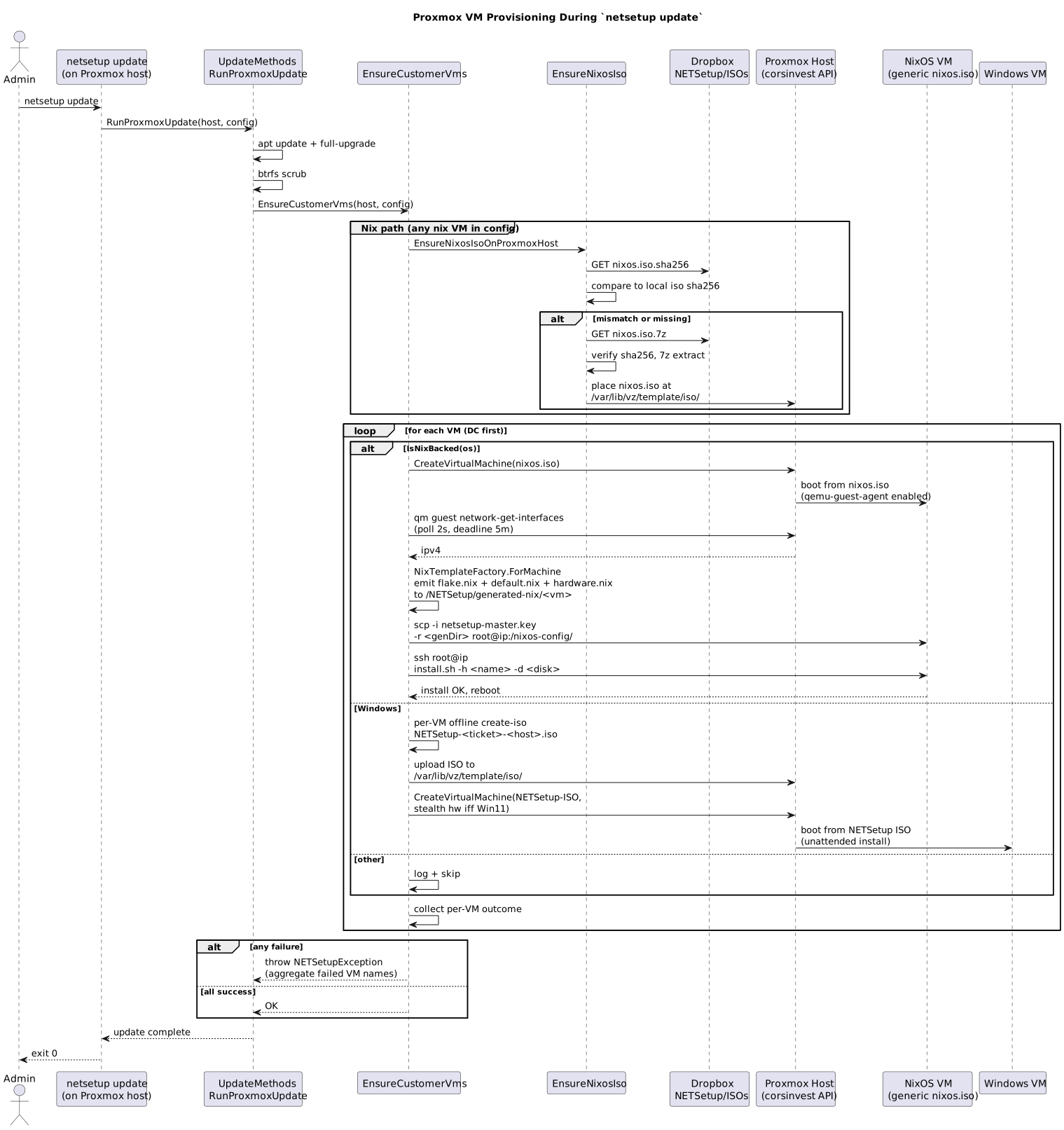
1.2.9.2. Liberator network topology
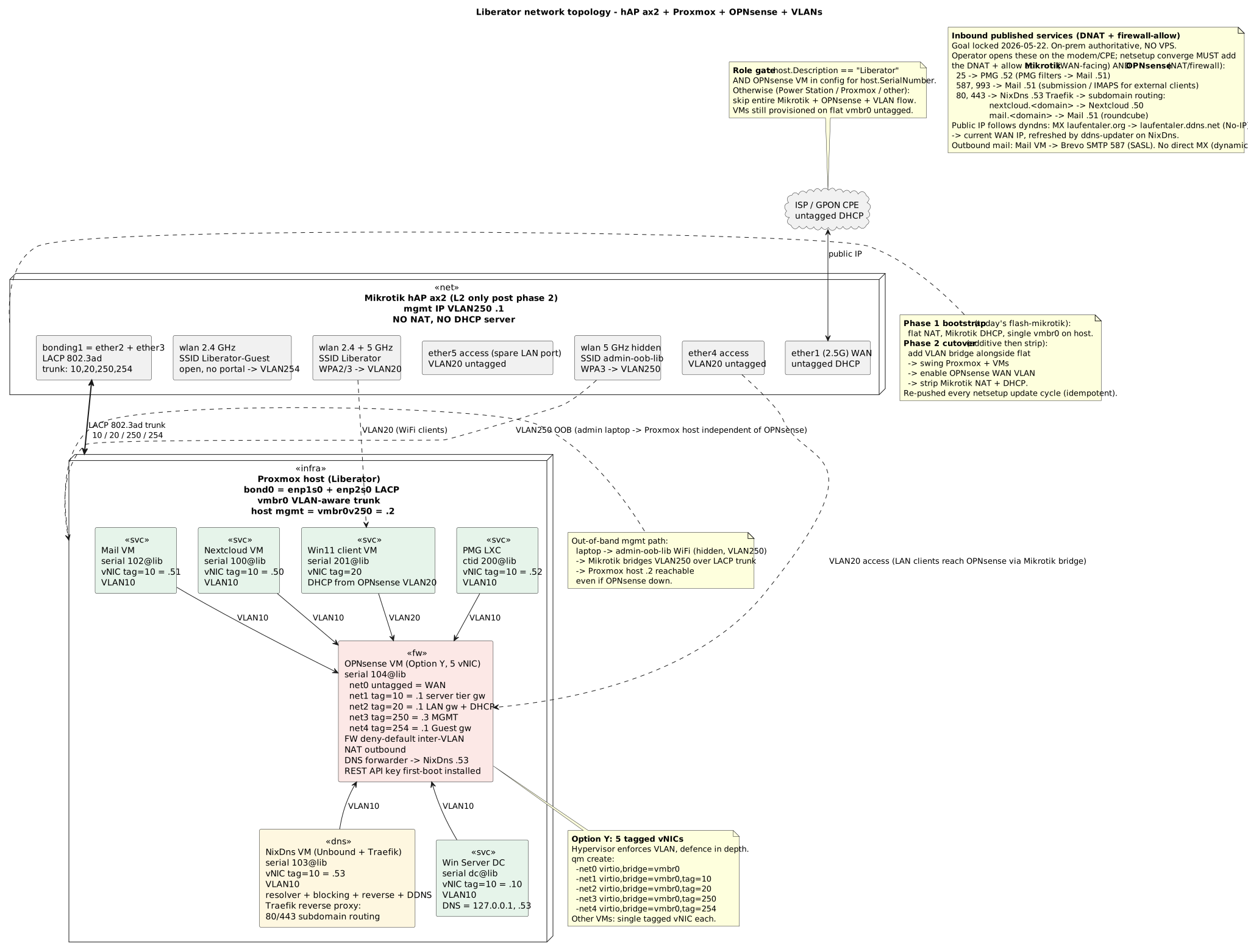
1.2.9.3. Liberator network push (cutover)
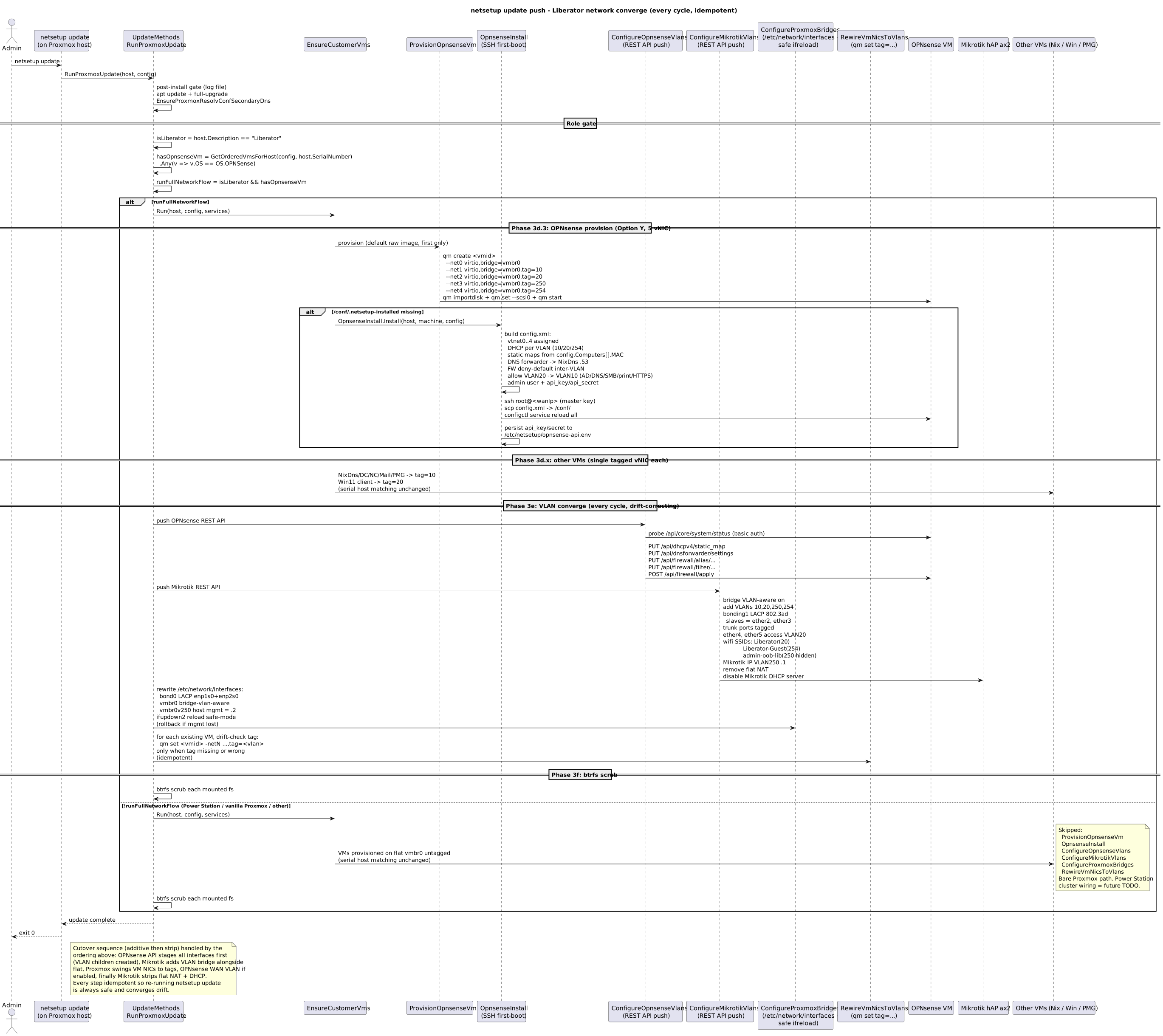
1.2.9.4. Public mail stack
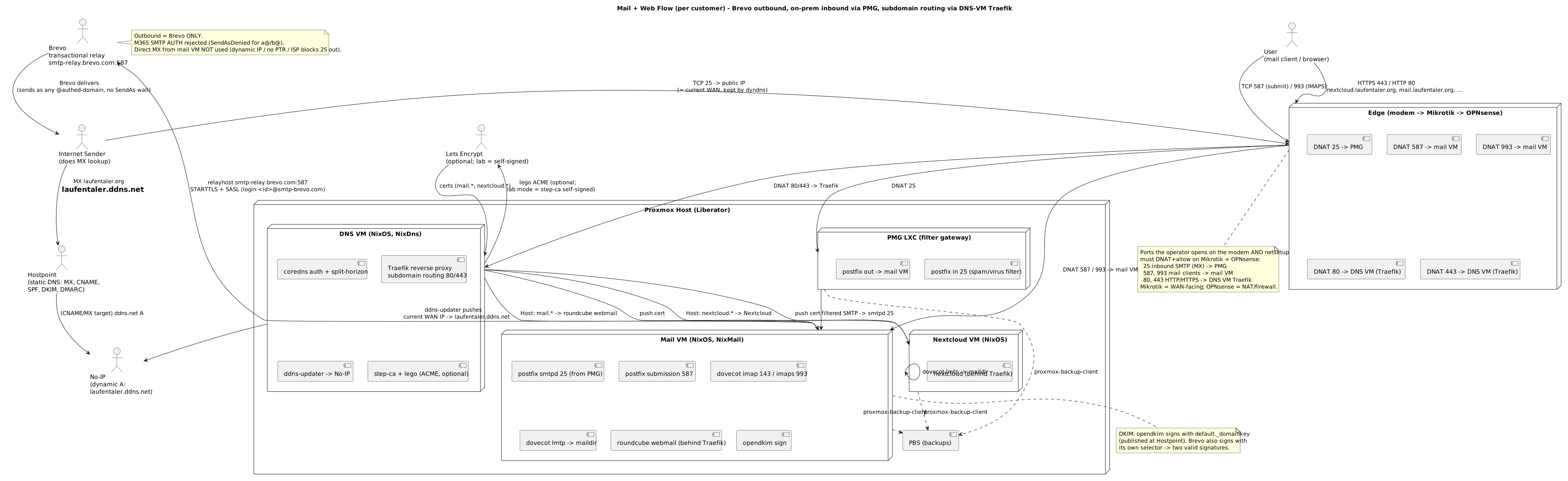
1.2.9.5. How an MSI is built (netbase-build + MSIBuild/WixSharp)
The Chocolatey packages NETSetup installs are produced upstream by netbase-build’s MSI
deployment method: netbase-build Push publishes the project, then shells out to the MSIBuild.exe tool
(WixSharp), which generates the WiX authoring (.wxs) and drives the WiX toolset (wix build) to compile it
into the .msi; an optional step wraps that .msi into the Chocolatey .nupkg pushed to netsetupprod.

1.2.10. How the domain join actually run
Stage 3 join the node to Active Directory. Two DIFFERENT code path exist and they do NOT behave the same -
which one run is decided by ONE config value. Everything below is read off
src/NETSetup/Extensions/DomainJoinMethods.cs and src/NETSetup/Stages/3-NETSetupWindows/Stage3Windows.cs.

1.2.10.1. The two gates before anything happen
| Gate | Rule |
|---|---|
is this a domain node |
|
already joined |
|
1.2.10.2. DNS get pinned to the DC first - both path do it
SetStaticDnsToDc run before either join. It read DirectoryService.GetSingle<NETSetupDC>().IP, grab the
adapter named Ethernet (fallback Ethernet Instance 0) and call SetDNSServerSearchOrder. A
DHCP-provided public DNS hide _ldap._tcp.dc._msdcs.<domain>, and the join then fail with 1355. A failure
HERE is logged as a warning only and does NOT abort - so a 1355 later is the symptom, not the cause.
1.2.10.3. Path A - Add-Computer -OUPath (taken when DomainOuPath is declared)
The ONLY path that can create the computer object directly in an OU. It run as an ENCODED PowerShell
command (PowershellCommand.Builder().UseEncoded()), so the password never land in console history - but
it IS in process memory, because Add-Computer want a PSCredential.
The exact script, with placeholders filled from the config:
$ErrorActionPreference = 'Stop'
$sec = ConvertTo-SecureString '{password}' -AsPlainText -Force
$cred = New-Object System.Management.Automation.PSCredential('{netbios}\{domainAdminUser}', $sec)
Add-Computer -DomainName '{domainName}' -Credential $cred -OUPath '{ouPath}' -Force -ErrorAction Stop
'JOINED ' + '{domainName}' + ' OU=' + '{ouPath}'
Where the values come from - none is a literal in code:
| Placeholder | Source in the config |
|---|---|
|
|
|
|
|
|
|
that same User’s |
|
|
Success is an EMPTY return string. Anything else is stdout + stderr, and Stage 3 call ExitFailure.
Before either path run, Stage 3 also execute nltest /dsgetdc:{netbios} /force purely as diagnostics and
write the output to the DomainConnection marker.
1.2.10.4. Path B - WMI JoinDomainOrWorkgroup (no OU declared)
live.GetSystem().JoinDomainOrWorkgroup(null, 23u, domainName, password, admin);23 = JOIN_DOMAIN(1) + ACCT_CREATE(2) + ACCT_DELETE(4) + DOMAIN_JOIN_IF_JOINED(16).
This path CANNOT target an OU - the object always land in the default container CN=Computers, which is
outside the GPO scope that grant osisa\LOCALADMINS local admin. That is exactly how devBuilder04 end up
unusable and had to be moved by hand. Declare DomainOuPath and path A run instead.
Return codes are mapped to readable text:
| Code | Meaning |
|---|---|
0 |
success (empty string returned) |
5 |
access denied for the user - the password WAS correct |
1326 |
bad credentials. The message echo the last 3 characters of the password, the rest starred |
1355 |
could not contact a domain controller for the domain (see the DNS pin above) |
2697 |
disparity between the AD entry and the machine - usually need a restart |
other |
run |
1.2.10.5. What happen AFTER a successful join
-
marker
DomainJoinis written; -
host.ExitReboot()- Stage 3 end the run and reboot; -
after the reboot Stage 3 re-enter, skip the marked step, and
Grant-DomainAdminsRDPrun; -
THEN the
WindowsCapabilitiesblock is applied. Order is load-bearing: a domain principal cannot be added to a local group while the machine is still in a workgroup.
1.2.10.6. Known failure, still open
The join FAIL on the lab nodes with Der Benutzername oder das Kennwort ist falsch (code 1326). The
mechanism above is correct and the wiring is right - only the stored secret is wrong. Verified 2026-09-10:
all twelve osisa configs carry the SAME domain-admin password across all four admin accounts, and a single
ValidateCredentials call against the DC return FALSE. The account itself is healthy - enabled, not locked,
member of Domain Admins, Enterprise Admins, Schema Admins - with PasswordLastSet 2025-09-08, AFTER those
configs were generated. Until a working password is put in the secret store, every new lab node need the
out-of-band djoin route and DomainOuPath never take effect.
Re-verified 2026-09-25: EVERY domain credential in #9157 and #9158 - repo copies AND published
Dropbox copies - fail LogonUser with win32 1326. Config-driven join still fail. djoin blobs for
devRunner03 and devRunner04 were provisioned into
OU=STATIC,OU=CLIENTS,OU=MACHINES,OU=OSISA,DC=corp,DC=osisa,DC=com as ordinary user loser. Durable
fix unchanged: put a WORKING domain-admin secret into NETSetup.kdbx.
1.2.11. Company model: what we have today, and which standards exist
|
Note
|
Research notes, 2026-08-16. This section only RECORDS findings and options. No decision, no recommendation. Nothing here is implemented. |
The IMPLEMENTED flow - how the company model actually become a NETSetupConfig - is
Company → Config: how a customer become a NETSetupConfig.
1.2.11.1. What the customer template actually is
We describe a customer twice, in two different shapes.
1. The document template - docs/Templates/Kunden-Netzwerkdokumentation.adoc. Its own header says
"Schema wie Staudt AG", so src/NETSetup/Config/Dokumentation_Staudt_AG.adoc (2535 lines) is the
reference implementation and the template is that document with the values stripped out.
Flat, seven part asset register:
| Section | Contains |
|---|---|
identity block |
Kunde, Anschrift, Strasse, PLZ/Ort, Tel, Haupt-E-Mail, Ansprechperson Auftrag, Ansprechperson Technik, Vertragstyp, Abschluss-/Lieferdatum, Freshdesk-Ticket |
|
Nr, Name, Tel, Mobil, E-Mail, Rolle |
|
device / IP / user / password, plus VPN (SSTP, IPSEC) |
|
Netzwerkskizze, Modem/Router, Internetzugang, Firewall (+ Portweiterleitungen), Domains |
|
Geteilte Mailboxen, Microsoft 365 Gruppen, Verteilerlisten |
|
Drucker, Druckerfreigaben |
|
one block per device |
The only organisational construct in the document is the device heading, which cross references a
person from == Kontakte:
=== StaudtAGDC,  <<osisaadmin>>
=== Staudt18,    <<alice.wasserfallen>>
The older instance docs/offer_process/Netzwerkdokumentation/2022-09-05_LuigicarsDokumentation.adoc
additionally carried Lizenzen, Freigaben, Gruppen, Benutzer und Gruppenzugehoerigkeit, Passwortliste
and Serverlogin. The template was narrowed since: passwords are now KeePass links only.
Only Staudt has an .adoc in this repo. Schnell and Carrera exist as code config only (Carrera doc
lives in the separate osisa/CarreraMarble repo).
2. The code model - Customers/*.cs. Vocabulary measured across all 20 customer configs, with
call counts:
HasTask 103 | AddDevice 81 | WithSerialNumber 81 | WithDevice 66 | UsesDevice 49
AddEmployee 49 | AddTask 36 | WithDescription 22 | AddOrganizationalUnit 6
WithHostname 3 | WithStaticIp 2 | WithGatewayIP 1
Shape:
Company (name, country, city)
  Device      (Server | RouterFirewall | Desktop | Laptop | Software) + serial + description
  Task        "Office", "Accounting", "ComputerAidedDesign", "BricsCAD 2020" ...
      WithDevice(<software>)          <- a Task BUNDLES software
  OrganizationalUnit                  ("CARRERAAG")
  Employee
      HasTask(<task>)                 <- what the person DOES
      UsesDevice(<device>)            <- what the person HAS
Three properties of this model, measured not assumed:
-
No hierarchy. No manager, no parent/child unit, no department tree.
-
AddOrganizationalUnitappears 6 times across 20 configs, roughly one per company, used as the AD domain container rather than as structure. -
The organising principle is the Task, not the position.
HasTaskis the most used verb in the whole corpus (103 calls).
So the model is a capability / assignment graph (Employee <→ Task <→ Software and
Employee <→ Device). It answers "who needs which software on which machine", not "who reports to
whom".
1.2.11.2. Standards that exist for describing an organisation
| Standard | Format | What it covers |
|---|---|---|
W3C ORG, The Organization Ontology |
RDF/OWL (serialisable as RDF/XML) |
W3C Recommendation, 16 Jan 2014. Nine classes: Organization, FormalOrganization,
OrganizationalUnit, Membership, Role, Post, Site, ChangeEvent, OrganizationalCollaboration, plus
25+ properties for hierarchy, membership, reporting, location and organisational history. Built to
be extended per domain. Our |
OASIS CIQ v3.0 |
XML / XSD |
xNL (names, party = Person or Organization, 36+ formats), xAL (addresses, 240+ countries, 130+ formats), xNAL (name + address), xPIL (Party Information), xPRL (Party Relationships). The mature XML answer for party master data. Our identity block maps closely onto xNAL/xPIL. |
eCH-0097 / eCH-0098 (Switzerland) |
XML / XSD |
eCH-0097 Datenstandard Unternehmensidentifikation defines the identifying attributes of an enterprise; with eCH-0098 Unternehmensdaten it forms the exchange format between Swiss authorities. Current version 5.2.0 (2021), maintained by Verein eCH. Ties to UID/CHE numbers. |
GLEIF LEI (ISO 17442) + RR-CDF 2.1 |
XML / XSD |
LEI identifies the legal entity. The Relationship Record CDF expresses "who owns whom" (IS_DIRECTLY_CONSOLIDATED_BY, direct and ultimate parent). The standard for legal entity group hierarchy. |
SCIM 2.0 (RFC 7643 / 7644) |
JSON (XML capable) |
IETF. Enterprise User extension carries employeeNumber, department, division, organization, manager. The operational identity view, closest to what netsetup provisioning actually does. |
ISO/IEC 6523 |
identifier scheme |
Organisation identification schemes (ICD codes). |
UBL / ISO 20022 |
XML |
Organisation as trading or payment counterparty. |
schema.org/Organization |
JSON-LD / microdata |
Publishing organisation data on the web. |
LDAP / X.500 |
directory schema |
The directory tree. This is what our AD OU actually is. |
ArchiMate business layer |
model / diagram |
Modelling actors, roles and collaborations diagrammatically. |
Gap worth recording: none of the above models "employee needs this software for this task on this device". That is CMDB / ITSM territory. The nearest normed neighbours are SCIM entitlements and W3C ORG’s documented extension points.
1.2.11.3. Sources
1.3. Changelog (NEWS)
1.3.1. 2026-05-05: public mail stack auto-prov per customer
Per-customer public mail stack. Three new hosted devices land on customer Proxmox
host plus PBS on host itself. All wired into existing EnsureCustomerVms /
EnsureProxmoxPostInstall pipeline.
-
FSD: Public Mail Stack — functional spec, decisions locked, deployment prereqs
-
Blueprint: Public Mail Stack — C# Implementation — file map, class signatures, build order
-
Mail Domain Setup — standalone vs smarthost runbook, per-provider account/token steps, DNS records, ISP gotchas, customer-builder code examples
-
netsetup-mail.puml — component + flow diagram (PBS, PMG LXC, mail VM, DNS VM, DDNS, ACME, smarthost)
-
Mail VM, DNS VM, PMG LXC — one bundle. Mail VM (NixOS, OS
NixMail): postfix submission 587 + smtpd 25 + internal LMTP-from-PMG on 26, dovecot imap 143/993 + lmtp unix socket, nginx + roundcube on 443. DNS VM (NixOS, OSNixDns): coredns auth zone + step-ca internal CA + lego LE DNS-01
ddns-updater. PMG LXC (Debian +proxmox-mailgateway, OSPmgLxc): inbound filter on 25, relays tomail.<domain>:26. PBS installed apt-style directly on Proxmox host (no extra VM, no extra container) with datastore auto-created at/var/lib/proxmox-backup/datastore. -
Provider-pluggable DNS + ACME. New
NETSetupConfig.DnsProviderPOCO (Provider,CredentialsFile,CredentialsAttrs) feeds both lego (cert issuance) and ddns-updater (A-record sync) on the DNS VM. Supported provider list (intersection of nixpkgsservices.ddns-updaterand lego):cloudflare,duckdns,namecheap,porkbun,gandi,hetzner,godaddy,ovh,dyn,noip. Same provider + credentials drive both tools 95% of the time — one knob in customer config, two services configured downstream. Cloudflare is example, NOT hardcoded. -
Optional smarthost relay. New
NETSetupConfig.MailRelayPOCO (Host,Portdefault 587,User,PassFile). When set, postfix on the mail VM routes outbound through that smarthost (Mailgun, Brevo, SES, M365, whatever) with STARTTLS + SASL. When null, postfix does direct MX delivery.PassFileis a SOPS-encrypted secret path on the mail VM; NETSetup never reads its content. -
DNS records auto-derived from customer config.
NixDnsTemplatescans every public-service VM hosted on the customer Proxmox host (NixNextcloud,NixMail,NixDns,NixIPFS,NixDocker,PmgLxc) and emits one A record per hostname under<CustomerDomain>zone, plus the PMGmxalias pointing atpmg.<domain>. Public hostnames (e.g.mail.<domain>,pmg.<domain>) become SANs on the LE certificate lego pulls via DNS-01. Adding a new hosted device means it shows up in DNS + cert SANs without touching the DNS template. -
New OS constants in
NetsetupOS.NixMail,NixDns,PmgLxc. The two Nix-prefixed names satisfyIsNixBackedautomatically and are routed byEnsureCustomerVms→NixHostTemplateFactoryto the newNixMailTemplate/NixDnsTemplate(subclasses ofNixHostTemplate).PmgLxcdoes NOT satisfyIsNixBacked— intentional, soEnsureCustomerVmsskips it — and is routed by the newEnsureCustomerLxcs→ProvisionPmgLxcinstead. -
LXC provisioning infrastructure — all new.
LxcCommand.Builderwraps/usr/sbin/pct(subcommands:create,start,stop,destroy,exec,set,status) using the sameAddNamed/AddBoolpattern as every other NETCommand builder — never rawAdd($"--flag {value}").ProvisionPmgLxcis the LXC equivalent ofProvisionNixosVm(static class,Run+RunCore, delegate seams): pct create with--features nesting=1 --unprivileged 1, pct start, pct exec installs PMG apt repo + key +apt install proxmox-mailgateway+ writes basic relay config pointing tomail.<CustomerDomain>:26. -
Wired into
RunProxmoxUpdate.EnsureCustomerLxcs.Runruns afterEnsureCustomerVms.Run— mandatory ordering, because the PMG relay config inside the LXC referencesmail.<domain>:26, so the mail VM must exist first.EnsurePbsInstalledis appended toEnsureProxmoxPostInstallafterEnsureLocalStorageEnabled(apt install proxmox-backup-server, idempotent dpkg check, datastore auto-create). Both new steps are individual NETCommand calls so failures stay scoped — same per-step pattern as the rest of the post-install pipeline. -
TestCompany fixture additions. Three new hosted devices on the Liberator test host (host serial
lib), inserted afterLibWin11:mail@lib(VMID 102, NixMail),dns@lib(VMID 103, NixDns),pmg@lib(CTID 200, PmgLxc).CustomerDomain = "test01.iam.free"set on the test config;DnsProvider = cloudflareplaceholder (provider swap is a one-line config change, not a code change). -
Manual e2e via
info@osisa.com. After the automated test leaves the stack live, operator sends a real mail frominfo@osisa.comto<user>@test01.iam.freeand verifies arrival in roundcube onhttps://mail.test01.iam.free/. Reply path back toinfo@osisa.comexercises the smarthost relay (or direct MX, depending onMailRelay). Automated e2e covers provisioning + service-up + DNS resolution: new test classProxmoxPublicMailTests.Liberator([Ignore("Local Tests")]) asserts PBS active on host,pct listshows pmg@lib,qm listshows mail+dns, dovecot/postfix/ nginx/coredns/step-ca/lego/ddns-updater allis-active,dig @localhost mail.test01.iam.freeresolves, and a rawHttpClientGET ofhttps://mail.test01.iam.free/returns the roundcube login. -
DDNS provider hook. ddns-updater on the DNS VM polls the customer site’s current public IP every 60 s (whatismyip / opendns), compares with the last-pushed value, and on change PATCHes the configured DNS provider’s API for every configured A record (
mail.<domain>,pmg.<domain>,mx.<domain>). MX record TTL pinned at 60 s for fast failover when the customer-edge dynamic IP rolls. Lego DNS-01 talks to the same provider for cert issuance + renewal, so a single provider account covers both record sync and ACME challenges.
-
1.3.2. 2026-04-15: Proxmox host self-update via GitHub Releases
netsetup update on a Proxmox host now upgrades itself end-to-end without leaving
the binary stale. The flow:
-
First-boot is USB-only.
netsetup-first-boot.shcopies the linux-x64 binary from the SYSTEM partition (labelSYSTEMon USB #1) andcp -ppreserves its mtime. No Dropbox / Pages fallback. Noself-update.sh. NoExecStartPre- the systemd unit simply runs/NETSetup/NETSetup update. -
Self-update via GitHub Releases.
UpdateMethods.EnsureLatestBinaryOrReexecruns as the first step of everynetsetup updatecycle. It decrypts an embedded fine-grained PAT (Contents:Read onosisa/netsetuponly, AES-256-CBC viaosisa.Security.Contracts.EncryptionHelpersostrings(1)only sees a base64 blob), GETs/repos/osisa/netsetup/releases/latest, parses the response withParseReleaseInfo, and compares versions withCompareSemVer. When the remote SemVer is strictly greater, it downloads the asset by id, swaps the binary atomically (mv -f),chmod 755, spawns the new binary asNETSetup update, waits, and `Environment.Exit`s with the child’s exit code. -
SemVer comparator with build-counter precedence. Same
major.minor.patch? The trailing dot-segment of the pre-release tail (the GitVersion build counter, e.g.249in0.9.0-proxmoxvms.249) is compared numerically - channel rename in CI does not invert the ordering. Per SemVer 2.0 a missing pre-release still outranks any present one (1.0.0 > 1.0.0-x). -
Post-install ran step-by-step in C#.
EnsureProxmoxPostInstallno longer writes a giant bash script. Each side-effect (disable enterprise repos, writepve-no-subscription.sources, install nag-removal hook, configure banners) is a discrete NETCommand orIFileOperatorcall so failures stay scoped. -
Customer VM provisioning (e.g. Nextcloud + Win11).
EnsureCustomerVms.Runis wired intoRunProxmoxUpdateafterapt full-upgrade. Machines whose serial format is<VMID>@<HostSerial>and whose OS is NixOS-backed (or Win10/11/Server) get provisioned on the local Proxmox host. TheOfflineCompanytest fixture has a Nextcloud server (100@lib) and a Win11 client (201@lib) hosted on the Liberator; testProxmoxWithUSBStickTests.Liberatorend-to-end (PASSED 2026-05-03, ~26 min) confirms post-install ran, both VMs were created, Nextcloud’s HTTPS endpoint serves on its DHCP IP (rawHttpClientprobe - accepts the 400 "Untrusted domain" Nextcloud returns when reached by IP), and the LibWin11 VM has the expected qm config (bios=ovmf, efidisk0, agent=1, ide-iso, scsi-btrfs).LibWin11 ISO pre-stage.
MainISO.CreateOfflineProductionISOrequires the netsetup source tree + dotnet SDK and so cannot run on a Liberator/Proxmox host. Build the per-VM Win11 ISO on the customer’s NETSetup build machine and ship it to the Proxmox host’s iso storage at/var/lib/vz/template/iso/NETSetup-{ticketId}-{hostname}.iso(whereticketIdis the int parse ofConfigNameor its FNV-1a hash for non-numericConfigName`s). `ProvisionWindowsVmOnProxmoxdetects an existing file at that path and skips the source-dependent rebuild. The Liberator test follows the same pattern:PreStageLibWin11IsoOnLiberatorbuilds locally + SCPs to Liberator before NETSetup runs.NixOS install on tmpfs-limited VMs.
ProvisionNixosVmattaches a 16 Gscsi1swap disk pre-create andNixRemoteInstallCommandrunsmkswap /dev/sdb && swapon /dev/sdb && mount -o remount,size=20G /nix/.rw-storebefore invokinginstall.sh. Without this the Nextcloud closure overruns the live-ISO tmpfs (RAM/2, ~4 G at 8 G RAM) witherror: writing to file: No space left on device. Liberator host RAM (15 G) cannot fit a 16 G nested VM, so swap is the workaround. Post-install usesqm stop+qm start(notqm reboot) because the live-ISO installer doesn’t honor ACPI shutdown. -
GitHub Actions publishes the linux-x64 binary as a release asset on every push to
main/develop(gh release upload v$SemVer NETSetup --clobber), so the self-update path always has a fresh build to pull.
1.3.3. 2025-07-03
Updated the Flow to include the future Flow for Liberators.
1.4. Legacy Reference & Scratch Notes
1.4.1. Direct download (advanced / fallback)
For environments without Chocolatey or for building an install ISO locally:
Sign in to GitHub with access to private osisa/NETSetup repository first.
Anonymous HTTP 404 does not prove release asset missing.
NETSetup install ISO is no longer published as a release asset. To build it: download NETSetup.exe above, run NETSetup.exe create-iso (see CLI Command Specification). Flash resulting NETSetup.iso to USB.
|
Important
|
Direct exe need
appsettings.json next to itChoco install drop Needs Grab the file from a choco install (
|
1.4.2. Dev machine setup (legacy scratch)
|
Note
|
Legacy scratch notes. Prefer the maintained Setup osisa NETBase dev machine and Verify dev-machine setup docs. Kept here for reference only. Any token below is a placeholder - use your own credentials, never a shared secret. |
setup using netsetup

(you might need mermaid-cli aka mmdc, npm install -g @mermaid-js/mermaid-cli, and add "%USERPROFILE%\AppData\Roaming\npm" to path)

set-executionpolicy -executionpolicy bypass -scope localmachine -force

Set-ExecutionPolicy Bypass -Scope Process -Force; iex ((New-Object System.Net.WebClient).DownloadString('http://netsetupprod.osisa.com:8080/install.ps1'))

choco source add --name=netsetup --source=http://netsetupprod.osisa.com:8080/chocolatey

cinst -y firefox git git-lfs vscode chocolateygui 7zip dotnetcore dotnet dropbox googlechrome infoniqaonestart2023_00 kmuline netsetupdb notepadplusplus office365netsetup teamviewer teams vlc windirstat asciidocfx putty ruby

2-machine
firewall
rdp
wallpaper
vpnToConfiguredVPNServer(connection to domain controller)

install-language en-us

set-winuilanguageoverride en-us

$LanguageList = Get-WinUserLanguageList
; $LanguageList.Add("en-US")
; $firstLang = $LanguageList[0].LanguageTag
; $LanguageList[0] = $LanguageList[-1]
; $LanguageList[-1] = $firstLang
; Set-WinUserLanguageList $LanguageList -force

set-ItemProperty -Path "REGISTRY::HKEY_LOCAL_MACHINE\SOFTWARE\Microsoft\Windows\CurrentVersion\Policies\System" -Name "dontdisplaylastusername" -Value 1

set-ItemProperty -Path "REGISTRY::HKEY_LOCAL_MACHINE\SOFTWARE\Microsoft\Windows\CurrentVersion\Policies\System" -Name "PromptOnSecureDesktop" -Value 0

set-ItemProperty -Path "REGISTRY::HKEY_LOCAL_MACHINE\SOFTWARE\Microsoft\Windows\CurrentVersion\Policies\System" -Name "shutdownwithoutlogin" -Value 0

set-ItemProperty -Path "REGISTRY::HKEY_LOCAL_MACHINE\SOFTWARE\Microsoft\Windows\CurrentVersion\Policies\System" -Name "ConsentPromptBehaviorAdmin" -Value "0"

Set-ItemProperty -Path "HKLM:\SOFTWARE\Microsoft\Windows\CurrentVersion\Policies\System" -Name "LocalAccountTokenFilterPolicy" -Value 1

Get-NetConnectionProfile | ForEach-Object {
    Set-NetConnectionProfile -NetworkCategory Private -Name $_.Name
    Set-NetConnectionProfile -NetworkDiscoveryEnabled true -Name $_.Name
}

[System.Environment]::SetEnvironmentVariable('DOTNET_ENVIRONMENT','Development',[System.EnvironmentVariableTarget]::Machine)

[System.Environment]::SetEnvironmentVariable('MSBuildEnableWorkloadResolver','true',[System.EnvironmentVariableTarget]::Machine)

[System.Environment]::SetEnvironmentVariable('MSDOTNET_SYSTEM_NET_HTTP_USESOCKETSHTTPHANDLE','false',[System.EnvironmentVariableTarget]::Machine)

git config --global --add safe.directory /git/

Enable-WindowsOptionalFeature -Online -FeatureName Microsoft-Hyper-V -All

reboot

domain join

login as your user (must be an admin)

3-user

[OSISA NUGET PACKAGE TODO]

dotnet nuget remove source github

dotnet nuget add source --name github "https://nuget.pkg.github.com/osisa/index.json" -u <your-email> -p <github-pat> --store-password-in-clear-text

"./nuget.exe setapikey <github-pat> -Source github"

dotnet tool install --global GitVersion.Tool

dotnet tool install --global gpr

dotnet tool install --global netbase.build --prerelease --no-cache

dotnet tool update --global netbase.build --prerelease --no-cache

gem install asciidoctor

gem install asciidoctor-diagram

asciidoctor -r asciidoctor-diagram -a diagrams docs/ghpages.adoc

[TODO INSTALL VS FROM CONFIG + COPILOT & RESHARPER]

Windows SDK

https://developer.microsoft.com/en-us/windows/downloads/windows-sdk/

add newest win to path, eg
C:\Program Files (x86)\Windows Kits\10\bin\10.0.22621.0\x64

Windows ADK
Windows EDK

Install-Module -Name OpenSSL
1.4.3. Domain model notes (legacy)
|
Note
|
Legacy design brain-dump of the planned contracts / entity model. Kept for reference. |
systemmanagement.contracts
	-> isoftware
	-> icomputer
	-> iuser

usermanagement.contracts
	-> irole
	-> igroup
	-> imembership
	-> idomain

human.contracts
	-> icontact
	-> inaturalperson
	-> iperson

localization.contracts
	-> ilocale
	-> itimezone

enterprise.contracts
	-> icompany
	-> iorganizationalunit
	-> iemployee
	-> icustomer
	-> isupplier
	-> idevice
	-> itask
	-> iservice

netsetup.contracts
	-> inetsetupsoftware [new: packagename]
	-> inetsetupcontact [new: naturalperson]
	-> inetsetupcustomer [new: conclusionDate, documentationLink]
	-> inetsetupmanageduser [new: associated computers]
	-> inetsetupdomain [new: groups replaced with functionality groups,
						computer list,
						contact list replaces person list]
	-> iconfig has domain, contacts, software

BSP
	funcionality = accounting
	accounting.softwareversion[0] = infoniqa v2023
	accounting.softwareversion[1] = office 365
	accounting.membership[0] = remo.oser [role: head]